Introduction
This guide will show how to replace the battery in the HP 15-ay078nr. The battery is the means of powering the device and may need to be replaced if the device can’t hold a charge or will not turn on if it is not connected to the charger. See symptoms that your battery needs to be replaced here. This could include not holding a charge, or not charging at all.
HP announced a Computer Battery Safety Recall and Replacement program where some HP 15-ay078nr devices may have been affected. The recall is about potential fire and safety hazards posed by the batteries. Read more about this recall here. See if your battery is affected and submit a claim here. If your battery is affected, you do not need to buy a replacement battery. HP will provide a battery for each verified, eligible battery. While waiting for the replacement, you may continue to use your device after removing the battery by plugging it into a power source.
Prior to removing the battery, make sure the device is powered off and is not connected to a charger. The battery may be hot if the device was recently used; wait until it is cool to the touch before beginning.
-
-
-
Orient the laptop so that the underside is facing up.
-
Rotate the device so that the CD slot is in the upper left corner.
 Ask FixBot
-
-
-
-
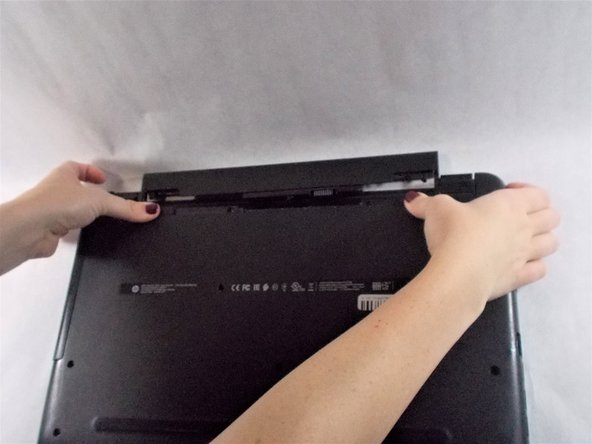
Using your fingers, push each battery latch simultaneously towards the middle.
-
Remove the battery from the laptop.
-
-



After installing the replacement battery, connect the device to a power source. The battery will not have a prior charge.
For optimal performance, after completing this guide, calibrate your newly installed battery.
Take your e-waste to an R2 or e-Stewards certified recycler.

Team

UMass Dartmouth, Team 3-1, Sinclaire Fall 2021 Member of UMass Dartmouth, Team 3-1, Sinclaire Fall 2021
UMASSD-SINCLAIRE-F21S3G1
3 Members
84 Guides authored
