Introduction
This guide will walk you through the process to remove and replace the cooling fan in an Hp 14-ep2011wm model laptop. The cooling fan helps regulate the devices temperature by preventing overheating during normal use. If the fan becomes noisy, stops spinning, or fails to cool the system properly, replacing it can restore proper airflow and performance. Before beginning, power off the laptop and disconnect from any external power sources.
What you need
-
-
-
Before beginning, shut down the laptop and disconnect it from the power source or cable.
 Ask FixBot
-
-
-
Turn laptop over so the bottom case is facing upward.
-
Using a screwdriver, remove the four corner screws securing the bottom cover.
-
-
-
Use a plastic spudger or similar object to pry open the plastic clips around the edges of the computer.
-
-
-
-
Carefully remove the bottom case cover revealing the internal components of the device.
-
-
-
Remove the screws securing the computer battery.
-
Gently lay the battery on its face.
-
-
-
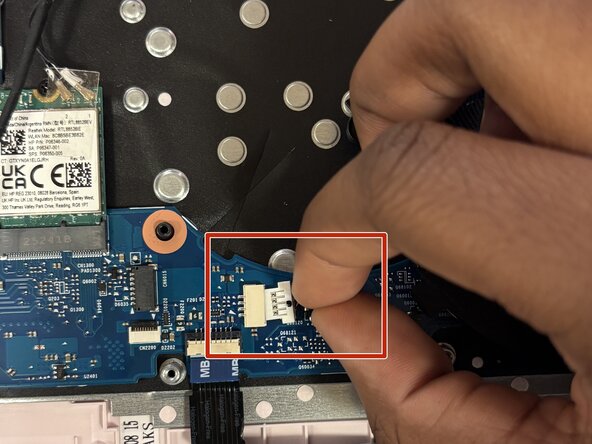
Disconnect the cable from the motherboard.
-
Gently unloop the cable out from under the holder attached to the left side of the fan.
-
-
-
Slightly lift the fan to better access the power connector.
-
Disconnect the fan power cable from the motherboard.
-
Remove the fan completely from the laptop.
-
-




To reassemble your device, follow these instructions in reverse order.

Team

Rose State College, Team 94-44, Kirkman Spring 2026 Member of Rose State College, Team 94-44, Kirkman Spring 2026
ROSE-KIRKMAN-S26S94G44
1 Member
12 Guides authored
