
Gourmia GMF600 Internal Fan Replacement

ayla bailey and one other contributor
Last updated on Jan 9, 2026
Views: 281
View statistics:
- Past 24 Hours:
- 2
- Past 7 Days:
- 19
- Past 30 Days:
- 70
- All Time:
- 281
Comments: 0
No one has left comments on this guide. Will you be first?
Go to guide commentsCompleted: 0 1
No one has marked this guide "completed." Will you be the first?
1 person has marked this guide "completed." It's you — great job!
Favorites: 0 1
No one has favorited (and subscribed to) this guide. Will you be the first?
1 person has favorited (and subscribed to) this guide — and that's you!
Needs More Images
A few more images would make this guide's procedures crystal clear.
Missing Steps
Oops! This guide is currently missing one or more important steps.
Introduction
Go to step 1 ↓If the internal fan in your Gourmia GMF600 mini fridge has failed, this guide will show you how to access and replace it.
The fan helps circulate cold air and maintain a consistent temperature. and if the fan has failed you can replace it and continue to use your mini fridge.
The repair is not difficult, but handle the internal wiring and connectors carefully to avoid damage.
Before you begin the repair, make sure the refrigerator is unplugged from the power outlet.
What you need
Tools
-
Spudger4.9


-
-
-
Orient the device so the back is facing you.
-
Use a Phillips #1 screwdriver to remove the six screws securing the back panel to the device.
 Ask FixBot
-
-
-
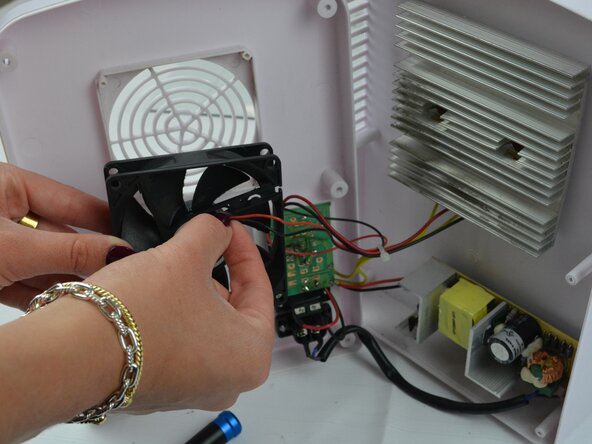
Use a Phillips #1 screwdriver to remove the four screws securing the fan.
-
Remove the fan and set it close to the refrigerator.
-
-
-
-
Carefully disconnect the cables from the fan to detach it from the board and thermoelectric cooler.
-
-


To reassemble your device, follow these instructions in reverse order. Take your e-waste to an R2 or e-Stewards certified recycler.
Team

Texas Tech, Team 41-2, Allen Fall 2025 Member of Texas Tech, Team 41-2, Allen Fall 2025
TTU-ALLEN-F25S41G2
2 Members
48 Guides authored
