
GoPro Hero 3+ Silver Edition Motherboard Replacement

Blake Ehlers and
Last updated on May 7, 2024
Views: 4.6K
View statistics:
- Past 24 Hours:
- 3
- Past 7 Days:
- 22
- Past 30 Days:
- 116
- All Time:
- 4,591
Comments: 4
2 comments on steps, 2 guide comments.
Go to guide commentsCompleted: 3 4
3 people have marked this guide "completed." Will you be next?
4 people have marked this guide "completed." Including you — great job!
Favorites: 4 5
4 people have favorited (and subscribed to) this guide. Will you be next?
5 people have favorited (and subscribed to) this guide — including you!
Featured Student Guide
This guide has been the hard work of our awesome students and is found to be exceptionally cool by the iFixit staff.
What you need
Parts


Tools


Introduction
Go to step 1 ↓Are the circuits of your GoPro's motherboard fried from water damage? This guide provides steps on how to replace a GoPro Hero 3+ Silver Motherboard and get your camera back in working condition.
-
-
-
Push the tab on the back of the device left to remove the plate covering the battery.
 Ask FixBot
-
-
-
-
-
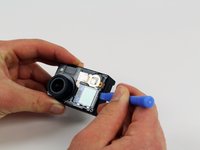
Insert a plastic opening tool in between the front face plate and the black housing.
-
-
-
Continue to use the plastic opening tool and separate the front face plate from the rest of the device.
-
-
-
-
-
-
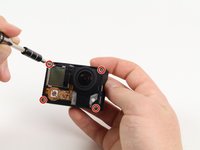
Locate the four 8.1mm PH00 screws on the corners of the GoPro and unscrew them using the phillips screwdriver.
-
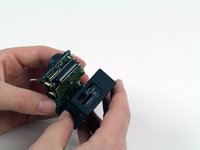
Gently remove the motherboard by using a plastic opening tool to pry it out of the housing.
-
-
-
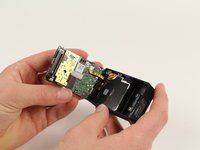
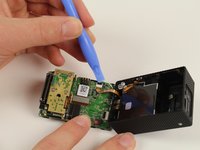
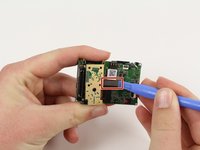
Remove the ribbon cable by carefully flipping the black clip up with the plastic opening tool and pulling the cable out.
-
-
-
Remove the four 4mm PH00 screws attaching the image sensor to the motherboard with your screwdriver.
-
-
-
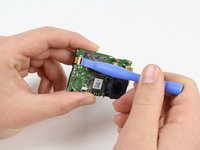
Pry off the last ribbon cable with a plastic opening tool.
-
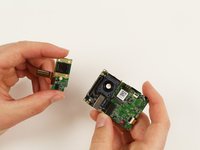
Remove the image sensor from the motherboard.
-
-
-
-
-
Remove the single 3.2mm PH00 screw with your screwdriver to detach the motherboard from the mid frame.
-
-
Tool used on this step:Tweezers$4.99
-
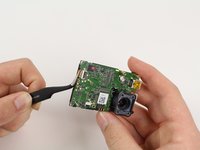
Use a plastic opening tool to gently separate the LCD ribbon cable from the motherboard.
-
Gently remove the motherboard from the midframe using tweezers.
-
-








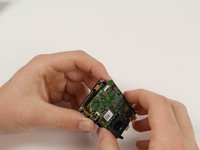
To reassemble your device, follow these instructions in reverse order.
Cancel: I did not complete this guide.
3 other people completed this guide.

Team

Cal Poly, Team 5-8, Maness Fall 2015 Member of Cal Poly, Team 5-8, Maness Fall 2015
CPSU-MANESS-F15S5G8
4 Members
72 Guides authored
