
Gigabyte RTX 3060 GPU Fan Replacement

sanskar1016 and one other contributor
Last updated on Dec 28, 2023
Views: 16K
View statistics:
- Past 24 Hours:
- 25
- Past 7 Days:
- 196
- Past 30 Days:
- 823
- All Time:
- 15,507
Comments: 1
1 guide comment.
Go to guide commentsCompleted: 5 6
5 people have marked this guide "completed." Will you be next?
6 people have marked this guide "completed." Including you — great job!
Favorites: 1 2
1 person has favorited (and subscribed to) this guide. Will you be next?
2 people have favorited (and subscribed to) this guide — including you!
Introduction
Go to step 1 ↓This guide is designed to aid individuals in replacing the GPU fan on the Gigabyte RTX 3060 Graphics Card. It includes various considerations that might be relevant to different repair scenarios. This guide addresses common problems associated with GPU fans, such as damaged fan blades or a malfunctioning fan unit connected to the graphics card. To carry out this repair, no specialized skills or tools are necessary, except for the Phillips #00 screwdriver mentioned in this guide.
Ensure that your workspace is tidy and free of clutter before you start the repair.
What you need
Tools

-
-
-
Remove the four springs screws attached to the thermal plate on the GPU using a Phillips #00 screwdriver.
-
Remove the two screws from the right side using a Phillips #00 screwdriver.
-
Remove the two screws from the left side using a Phillips #00 screwdriver.
 Ask FixBot
-
-
-
Lift the backplate off after the screws are removed.
-
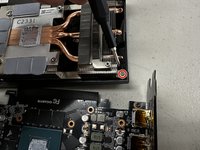
Carefully remove the connector at the top of the GPU (the side with GEFORCE RTX like on the picture) connecting the GPU board and the fan cover.
-
-
-
Flip over the GPU cover.
-
Remove the four screws using a Phillips #00 screwdriver.
-
-
-
Set the thermal system to the side.
-
Flip over the GPU cover with the fans and find the fan that needs to be replaced.
-
There are three screws underneath the fan blades. Look at the second picture as a reference for one of the screws. Remove all three using a Phillips #00 screwdriver.
-
-
-
-
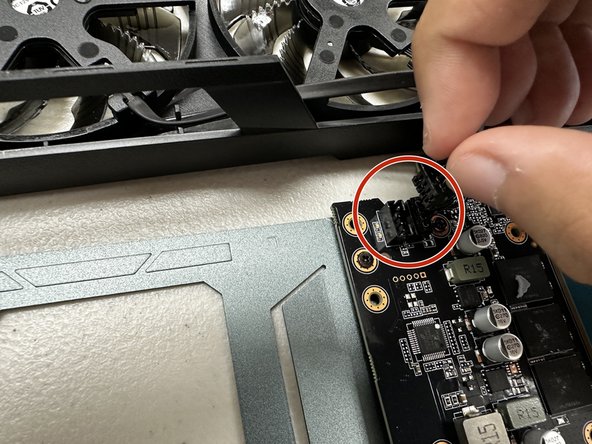
Remove the connector associated with the fan.
-
Pull the fan out with its connector cable intact.
-
-
-
Grab your replacement fan for the Gigabyte RTX 3060.
-
The repair can be completed with the replacement fan by reversing the steps previously shown.
-
-






To reassemble your device, follow these instructions in reverse order.
Cancel: I did not complete this guide.
5 other people completed this guide.

Team

CSU Los Angeles, Team 4-22, Kershman Fall 2023 Member of CSU Los Angeles, Team 4-22, Kershman Fall 2023
CSULA-KERSHMAN-F23S4G22
1 Member
12 Guides authored
1 Guide Comment
и потом через время карта сломается. это написано делитантом для делитантов. ни слова о замене термопасты. собрать в обратном порядке, и не заменить термопасту, это трешь. не рекомендую это никому.
