
Gateway NV55C49u Battery Replacement

Ethan Nall and 3 other contributors
Last updated on Aug 30, 2020
Views: 802
View statistics:
- Past 24 Hours:
- 2
- Past 7 Days:
- 16
- Past 30 Days:
- 66
- All Time:
- 802
Comments: 0
No one has left comments on this guide. Will you be first?
Go to guide commentsCompleted: 1 2
1 person has marked this guide "completed." Will you be next?
2 people have marked this guide "completed." Including you — great job!
Favorites: 0 1
No one has favorited (and subscribed to) this guide. Will you be the first?
1 person has favorited (and subscribed to) this guide — and that's you!
Introduction
Go to step 1 ↓If your laptop charge is draining quickly, or the laptop won’t turn on, use this guide to replace the battery. The battery replacement on this laptop is a simple swap because there are no screws, glue, or small parts you have to work with.
What you need
Tools


 Ask FixBot


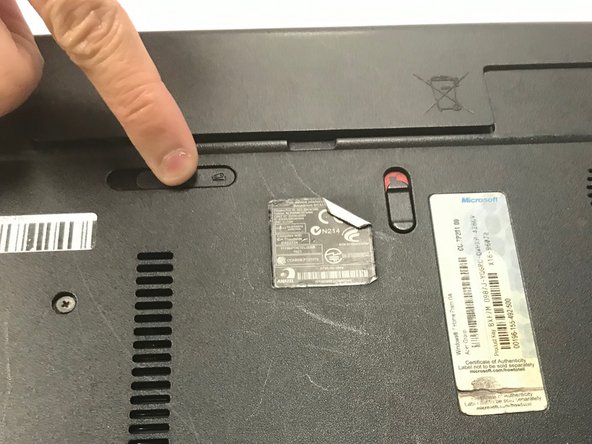


To reassemble your device, follow these instructions in reverse order.
Cancel: I did not complete this guide.
One other person completed this guide.

Team

University of North Texas, Team S8-G1, Riccardelli Fall 2018 Member of University of North Texas, Team S8-G1, Riccardelli Fall 2018
UNT-RICCARDELLI-F18S8G1
5 Members
60 Guides authored
