Free Shipping on Domestic Orders $75+

Gateway NV53A24u Keyboard Replacement

What you need

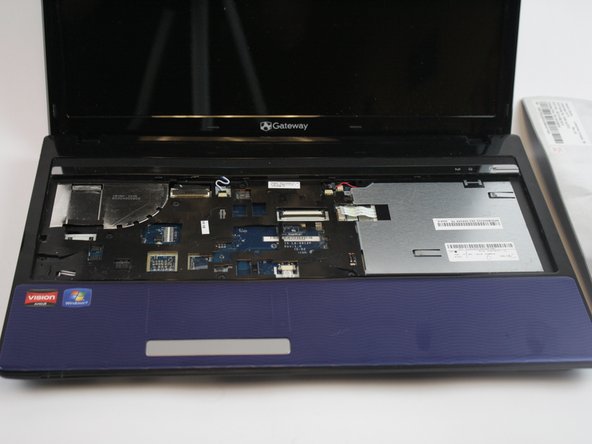
  1. Gateway NV53A24u Keyboard Replacement, Keyboard: step 1, image 1 of 1
    • Before removing the keyboard, turn off the computer and open it.

    Ask FixBot

    Add Comment

  2. Gateway NV53A24u Keyboard Replacement: step 2, image 1 of 2 Gateway NV53A24u Keyboard Replacement: step 2, image 2 of 2
    • Use a spudger to gently pry out the keyboard.

    • When working with electronics, it's important to choose a tool that's ESD-safe to avoid accidental damage to the device. The metal spudger is great when you need serious prying power, but a regular black nylon spudger should be used whenever possible.

    • There are small metal tabs holding it in place beneath the bezel. Using your tool, you should be able to easily pop the keyboard out.

    Ask FixBot

    Add Comment

  3. Gateway NV53A24u Keyboard Replacement: step 3, image 1 of 2 Gateway NV53A24u Keyboard Replacement: step 3, image 2 of 2
    • Once the keyboard is removed, you may have to remove the connecting ribbon cable, but it easily pulls out.

    Ask FixBot

    Add Comment

Conclusion

To reassemble your device, follow these instructions in reverse order.

Cancel: I did not complete this guide.

One other person completed this guide.

tannerroan

Member since: 10/11/16

342 Reputation

2 Guides authored

Team

USF Tampa, Team 1-5, Leahy Fall 2016 Member of USF Tampa, Team 1-5, Leahy Fall 2016

USFT-LEAHY-F16S1G5

3 Members

10 Guides authored

0 Guide Comments

Add Comment

View Statistics:

Past 24 Hours: 1

Past 7 Days: 7

Past 30 Days: 38

All Time: 857