Free Shipping on Domestic Orders $75+

Gateway MS2285 Battery Replacement

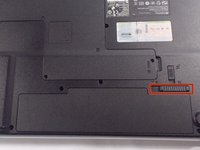
    1. Gateway MS2285 Battery Replacement, Turn Laptop Over: step 1, image 1 of 1
      • Turn the laptop over so that the underside is facing towards you.

      Ask FixBot

      Add Comment

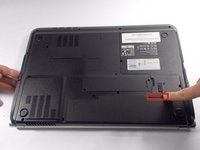
    2. Gateway MS2285 Battery Replacement, Unlock The Battery: step 2, image 1 of 2 Gateway MS2285 Battery Replacement, Unlock The Battery: step 2, image 2 of 2
      • Slide the short slider one towards the unlocked lock symbol.

      Ask FixBot

      Add Comment

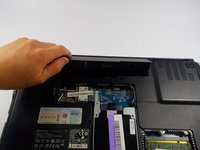
    3. Gateway MS2285 Battery Replacement, Release The Battery: step 3, image 1 of 2 Gateway MS2285 Battery Replacement, Release The Battery: step 3, image 2 of 2
      • Slide the long slider towards the unlocked lock icon.

      • This slider is spring loaded and may require a little force.

      • If done correctly, a click will be heard and the battery will be slightly raised.

      Ask FixBot

      Add Comment

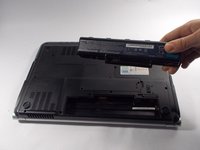
    4. Gateway MS2285 Battery Replacement, Remove The Battery: step 4, image 1 of 2 Gateway MS2285 Battery Replacement, Remove The Battery: step 4, image 2 of 2
      • Grasp the battery's raised end and lift upwards.

      Ask FixBot

      Add Comment

Conclusion

To reassemble your device, follow these instructions in reverse order.

Cancel: I did not complete this guide.

Chris mello

Member since: 10/22/14

331 Reputation

3 Guides authored

Team

UMass Dartmouth, Team 1-7, Shastany Fall 2014 Member of UMass Dartmouth, Team 1-7, Shastany Fall 2014

UMASSD-SHASTANY-F14S1G7

3 Members

36 Guides authored

0 Guide Comments

Add Comment

View Statistics:

Past 24 Hours: 1

Past 7 Days: 6

Past 30 Days: 33

All Time: 1,632