Free Shipping on Domestic Orders $75+

Gateway MA6 Laptop Cooling Assembly Replacement

What you need

    1. Gateway MA6 Laptop Cooling Assembly Replacement, Cooling Assembly: step 1, image 1 of 2 Gateway MA6 Laptop Cooling Assembly Replacement, Cooling Assembly: step 1, image 2 of 2
      • Loosen the seven 6 mm Phillips #0 screws on the back of the case.

      • Leave all the screws in the back plate and so you don't lose them.

      Ask FixBot

      Add Comment

    2. Gateway MA6 Laptop Cooling Assembly Replacement: step 2, image 1 of 2 Gateway MA6 Laptop Cooling Assembly Replacement: step 2, image 2 of 2
      • Pull upwards on the top of the back cover to remove it.

      Ask FixBot

      Add Comment

    3. Gateway MA6 Laptop Cooling Assembly Replacement: step 3, image 1 of 1
      • Remove the four 9 mm Phillips #0 screws from the cooling assembly.

      Ask FixBot

      Add Comment

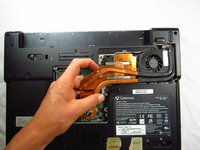
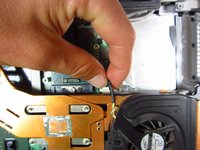
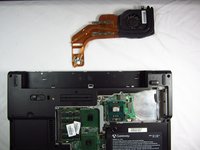
    4. Gateway MA6 Laptop Cooling Assembly Replacement: step 4, image 1 of 3 Gateway MA6 Laptop Cooling Assembly Replacement: step 4, image 2 of 3 Gateway MA6 Laptop Cooling Assembly Replacement: step 4, image 3 of 3
      • Gently and carefully remove the cooling assembly to avoid ripping the wire attaching it to the computer.

      • Gently flip the cooling fan assembly upside-down on the computer surface.

      • Carefully grab the wire attached to the computer and pull away from the port.

      • The cooling fan is now safe for removal.

      Ask FixBot

      Add Comment

    5. Gateway MA6 Laptop Cooling Assembly Replacement: step 5, image 1 of 1
      • When reinstalling heat sink and fans clean off the old thermal paste from both the heat sink and the CPU and then add new paste to CPU

      • If your unfamiliar with applying thermal paste How to Apply Thermal Paste

      Ask FixBot

      Add Comment

Conclusion

To reassemble your device, follow these instructions in reverse order.

Cancel: I did not complete this guide.

2 other people completed this guide.

Chris Naughton

Member since: 04/07/14

727 Reputation

5 Guides authored

Team

Cal Poly, Team 6-2, Forte Spring 2014 Member of Cal Poly, Team 6-2, Forte Spring 2014

CPSU-FORTE-S14S6G2

5 Members

96 Guides authored

0 Guide Comments

Add Comment

View Statistics:

Past 24 Hours: 1

Past 7 Days: 8

Past 30 Days: 38

All Time: 1,306