
Garmin inReach Explorer Plus Battery Replacement

Bayden Davies and 3 other contributors
Last updated on Dec 28, 2021
Views: 1.9K
View statistics:
- Past 24 Hours:
- 1
- Past 7 Days:
- 11
- Past 30 Days:
- 57
- All Time:
- 1,918
Comments: 0
No one has left comments on this guide. Will you be first?
Go to guide commentsCompleted: 0 1
No one has marked this guide "completed." Will you be the first?
1 person has marked this guide "completed." It's you — great job!
Favorites: 0 1
No one has favorited (and subscribed to) this guide. Will you be the first?
1 person has favorited (and subscribed to) this guide — and that's you!
Needs Better Images
Better photos will improve this guide. Help out by taking, editing, or uploading new ones!
Needs More Images
A few more images would make this guide's procedures crystal clear.
Introduction
Go to step 1 ↓This guide will demonstrate how to remove the battery from the N. Garmin inReach Explorer Plus. The battery allows the Garmin Device to be able to run and operate at a functional level for up to 75 hours. The battery may be in need of removing if the Garmin device won’t operate normally. This could be due to the battery being damaged or even dead. For more details about problems as to why the battery should be removed, visit our Troubleshooting guide page. Along with this the battery could potentially be swollen. This would mean that the battery is punctured and can cause dangerous gases to leave the battery. To handle this dangerous problem, have the device uncharged and unplugged when removing the battery. While removing the battery make sure the batteries are cooled down and not heated and be sure to replace and dispose of the old battery properly. Lastly, knowing all the possible problems that can lead to a faulty battery, there are many different safety guides to take into consideration. Metal should not be anywhere near the removal of the battery process, both terminals on the battery cannot be in contact with any other item, wear protective gear such as eyewear, gloves, etc, and finally, practice safe lifting procedures when removing the battery. This will lead to less likelihood of dropping and breaking the damaged battery which would cause hazardous gases to be leaked. To learn more about safety precautions please visit the battery safety procedure page here.
What you need
Tools

-
-
-
Using the TR6 Torx Security screwdriver, remove six 10 mm screws from the back cover of the device.
 Ask FixBot
-
-
-
-
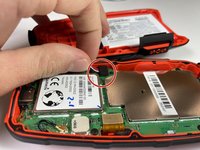
Gently grasp the battery wire and disconnect it from the device.
-
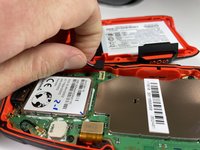
Remove the battery from the device.
-
-


To reassemble your device, follow these instructions in reverse order.
For optimal performance, after completing this guide, calibrate your newly installed battery.
Take your e-waste to an R2 or e-Stewards certified recycler.

Team

Clemson, Team 5-4, Hunter Fall 2021 Member of Clemson, Team 5-4, Hunter Fall 2021
CLEM-HUNTER-F21S5G4
4 Members
60 Guides authored
