Introduction
This guide uses the iOpener and black spudger to remove the broken screen from the device, allowing for replacement. Screen replacement will compromise waterproof integrity.
What you need
-
-
-
Apply the Heated iOpener to the display for 30 seconds to soften the adhesive..
 Ask FixBot
-
-
-
Insert a spudger between the display and watch body.
-
Pry upwards and work the spudger around the perimeter of the display to free it from the body.
-
-
-
-
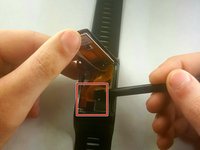
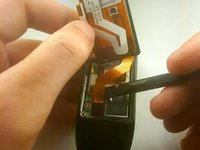
Lift the touchscreen to expose ribbon cables that connect it to the main circuit board.
-
-
-
Use the flat end of a spudger to disconnect the display cable press connectors from the motherboard.
-
-


To reassemble your device, follow these instructions in reverse order.
Cancel: I did not complete this guide.
18 other people completed this guide.

Team

IUPUI, Team S2-G5, Harley Summer 2018 Member of IUPUI, Team S2-G5, Harley Summer 2018
IUPUI-HARLEY-SU18S2G5
3 Members
24 Guides authored
19 Guide Comments
Hello,
thanks for this. Where can i buy the new screen?
Nice guide! Thanks. But I can’t find any parts to repair my watch
What type of glue i use to connect the display an the body?
I’ve only found a couple sources for the adhesive.
