
Garmin StreetPilot c330 Battery Replacement

Adrian Leon and 15 other contributors
Last updated on Nov 30, 2022
Views: 5.2K
View statistics:
- Past 24 Hours:
- 2
- Past 7 Days:
- 14
- Past 30 Days:
- 75
- All Time:
- 5,246
Comments: 0
No one has left comments on this guide. Will you be first?
Go to guide commentsCompleted: 1 2
1 person has marked this guide "completed." Will you be next?
2 people have marked this guide "completed." Including you — great job!
Favorites: 2 3
2 people have favorited (and subscribed to) this guide. Will you be next?
3 people have favorited (and subscribed to) this guide — including you!
Needs Better Images
Better photos will improve this guide. Help out by taking, editing, or uploading new ones!
Introduction
Go to step 1 ↓Use this guide to replace a full or faulty battery in your Garmin StreetPilot c330
The Garmin StreetPilot c330 is a device that comes with automatic route calculation to any destination, and turn-by-turn voice-prompted directions. If your Garmin StreetPilot c330 no longer stays turned on if unplugged despite being charged for a reasonable amount of time. This is usually a sign of an old or damaged battery. In this case, replacement is necessary.
Before using this guide, make sure to review the troubleshooting page—oftentimes, problems with loose charging cables or damaged charging cables could cause a problem.
A punctured battery can cause a dangerous fire. If your battery is swollen, take appropriate precautions.
Make sure to power down your device before you begin.
What you need
Tools
-
-
Spudger4.9
-


-
-
-
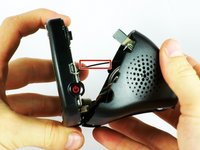
At the top of the outer frame, insert the plastic spudger into the groove in the center.
-
Lever the frame gently until it pops out of the case.
 Ask FixBot
-
-
-
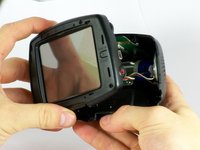
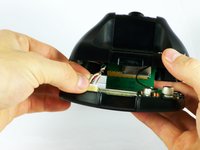
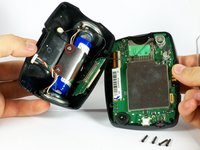
Gently pull from both ends of the casing to separate the front and back panels.
-
-
Tool used on this step:Tweezers$4.99
-
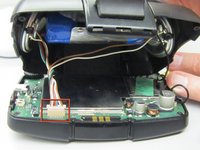
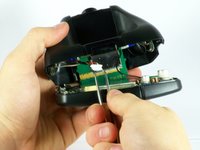
Gently unplug the white cable connector using either your fingers or tweezers.
-
-
-
-
-
-
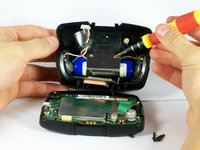
Use a Phillips #00 screwdriver to remove the two screws from the battery bracket.
-
-
-
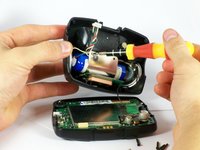
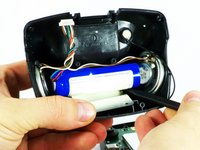
Carefully peel the metal bracket away from the battery.
-
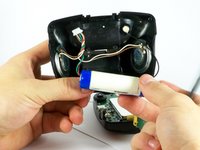
Pull the battery away from the back cover.
-
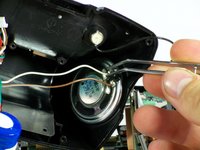
Desolder the wires from the speakers using a soldering iron.
-
-








To reassemble your device, follow these instructions in reverse order.
Cancel: I did not complete this guide.
One other person completed this guide.

Team

Cal Poly, Team 22-1, Maness Fall 2010 Member of Cal Poly, Team 22-1, Maness Fall 2010
CPSU-MANESS-F10S22G1
3 Members
48 Guides authored
