Introduction
The Garmin Nuvi 2559 (sometimes referred to as Nuvi 2559 LM) is a portable GPS navigation device used for vehicle navigation. This guide shows how to replace the internal lithium-ion battery.
The battery stores and provides power to the device. Symptoms indicating a failing battery include rapid power loss, device only working when plugged in, or failure to turn on. Replacing the battery restores proper device operation. Related troubleshooting information can be found here.
Important tips and warnings:
- Use caution with swollen or damaged batteries — puncturing can be dangerous.
- Disconnect the battery before performing any repairs.
- Do not bend or puncture the battery.
- Use ESD-safe tools to protect internal electronics.
- Dispose of old batteries properly at an authorized recycling center.
This guide will walk you step-by-step through safely opening the Garmin Nuvi 2559, removing the old battery, and installing a new one.
What you need
-
-
Remove the four 5.0 mm screws from the backplate using a Phillips #1 screwdriver.
-
-
-
-
Insert an opening tool into the seam between the front and back halves of the device.
-
Gently slide the tool along the edges to release the internal clips.
-
Work slowly around the entire perimeter to avoid breaking the plastic tabs.
-
-
-
Pry the battery from the adhesive using the black nylon spudger as leverage.
-
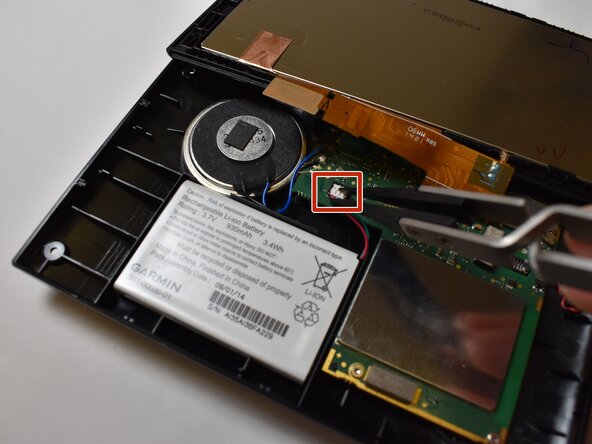
Disconnect the wire from the motherboard using tweezers.
-
Remove the battery.
-


 Ask FixBot




To reassemble your device, follow these instructions in reverse order.

Team

Purdue University Northwest, Team 3-4, Dieterle Fall 2025 Member of Purdue University Northwest, Team 3-4, Dieterle Fall 2025
PNW-DIETERLE-F25S3G4
5 Members
5 Guides authored
