Introduction
The Garmin Nuvi 2559 (also known as Nuvi 2559 LM) is a portable GPS navigation device designed for vehicle use. This guide shows how to replace the backplate of the device.
The backplate is the rear housing that protects the internal components, provides structural support, and helps maintain the device’s overall durability. Over time, the backplate can become cracked, scratched, or loose, potentially exposing internal components to damage or affecting device stability. Replacing it restores structural integrity and protects the electronics inside.
Important tips and warnings:
- Disconnect the battery before removing the backplate to prevent short circuits.
- Use ESD-safe tools to avoid damaging the internal electronics.
- Take care not to damage ribbon cables or connectors while removing the backplate.
- Ensure all clips are properly aligned during reassembly to avoid breaking them.
- Damaged waterproofing may occur if the device has been exposed to moisture; be cautious when handling.
This guide will walk you step-by-step through safely removing the old backplate and installing a replacement on the Garmin Nuvi 2559.
What you need
-
-
Remove the four 5.0 mm screws from the backplate using a Phillips #1 screwdriver.
-
-
-
Insert an opening tool into the seam between the front and back halves of the device.
-
Gently slide the tool along the edges to release the internal clips.
-
Work slowly around the entire perimeter to avoid breaking the plastic tabs.
-
-
-
Use an opening tool to gently pry the ribbon cable from its connector.
-
Once the plastic frame is fully released, carefully separate it from the motherboard and set it aside.
-
-
-
-
Disconnect the battery cable from the motherboard using tweezers.
-
-
-
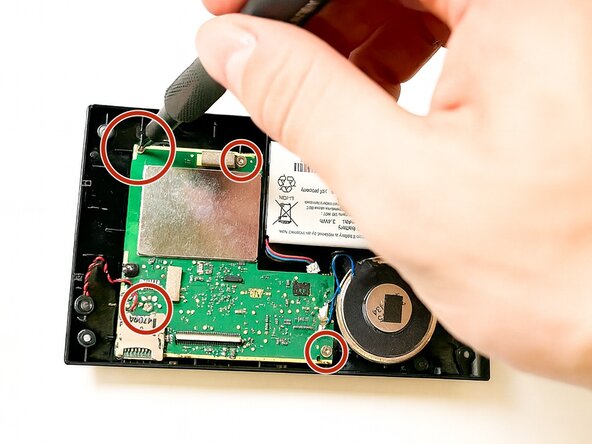
Remove the four 3.5 mm screws from the motherboard using a Phillips #1 screwdriver.
-
-
-
Remove the last component keeping the motherboard connected to the backplate by pulling upwards with the tweezers.
-
-
-
Use the black nylon spudger to remove the motherboard and connecting speaker.
-
-
-
Pry the battery from the adhesive using the black nylon spudger as leverage.
-


 Ask FixBot




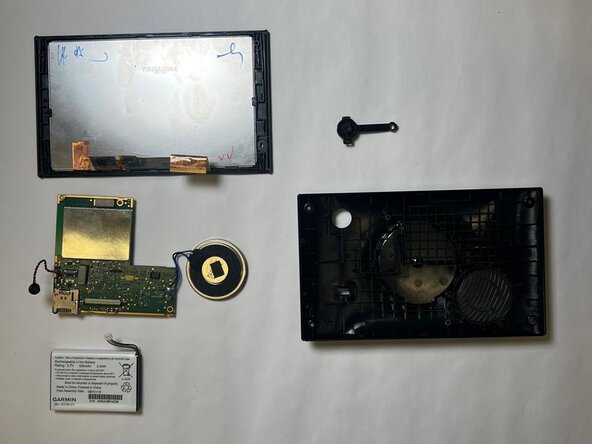


To reassemble your device, follow these instructions in reverse order.
Cancel: I did not complete this guide.
One other person completed this guide.

Team

Purdue University Northwest, Team 3-4, Dieterle Fall 2025 Member of Purdue University Northwest, Team 3-4, Dieterle Fall 2025
PNW-DIETERLE-F25S3G4
5 Members
5 Guides authored
