Introduction
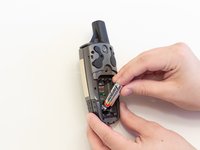
One possibility for your device not powering on or responding is old or corroded batteries. This is a guide to remove and replace the Garmin GPSmap 60CSx AA batteries.
What you need
-
-
Lift and twist the battery cover release 90 degrees counterclockwise on the back of the device.
 Ask FixBot
-
-


Conclusion
To reassemble your device, follow these instructions in reverse order.

Team

Linn Benton Community College, Team S2-G5, Johnson Spring 2018 Member of Linn Benton Community College, Team S2-G5, Johnson Spring 2018
LBCC-JOHNSON-S18S2G5
5 Members
5 Guides authored
