
Garmin Forerunner 405 Button Replacement

Kyle Kiwczak and 4 other contributors
Last updated on Jul 31, 2026
Views: 4.2K
View statistics:
- Past 24 Hours:
- 3
- Past 7 Days:
- 24
- Past 30 Days:
- 90
- All Time:
- 4,242
Comments: 2
2 guide comments.
Go to guide commentsCompleted: 0 1
No one has marked this guide "completed." Will you be the first?
1 person has marked this guide "completed." It's you — great job!
Favorites: 0 1
No one has favorited (and subscribed to) this guide. Will you be the first?
1 person has favorited (and subscribed to) this guide — and that's you!
Slice and Dice
The steps in this guide should be split up and made into a series of prerequisite guides.
Introduction
Go to step 1 ↓This guide will walk you through the process of replacing a button on the Forerunner 405.
What you need
Tools


-
-
-
Unscrew the four 6.35 mm Torx T5 screws securing the backing of the watch.
 Ask FixBot
-
-
-
Unscrew one 4 mm philips screw that attaches the motherboard using a PH000 screwdriver.
-
Lift the motherboard out of the watch.
-
-
-
Tool used on this step:Tweezers$4.99
-
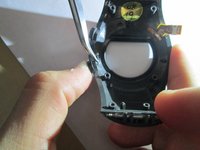
Push button in and pinch silver clip with tweezers.
-
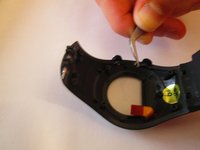
Pull silver clip off the pin it is on.
-
Pull out button and replace.
-
-


To reassemble your device, follow these instructions in reverse order.

Team

USF Sarasota-Manatee, Team 1-4, Stewart Fall 2014 Member of USF Sarasota-Manatee, Team 1-4, Stewart Fall 2014
USFSM-STEWART-F14S1G4
4 Members
168 Guides authored
2 Guide Comments
Where to find repair button for FR60? Can it be 3d printed? Garmin asks too much out-of-warranty
I took mine apart to find that the jammed button was actually bent. Using two pairs of needle-nose pliers, I was able to straighten it and re-use it. The watch works great now.
