Free Shipping on Domestic Orders $75+

Garmin DriveSmart 50 LMT Speaker Replacement

What you need

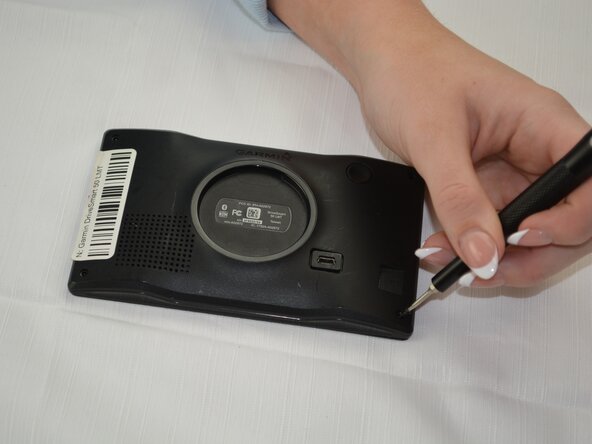
  1. Garmin DriveSmart 50 LMT Speaker Replacement, Speaker: step 1, image 1 of 1
    • Use a T5 Torx screwdriver to remove the four screws from the bottom case.

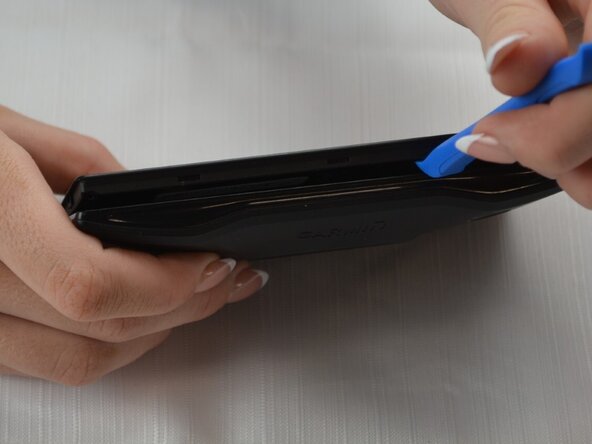
  2. Garmin DriveSmart 50 LMT Speaker Replacement: step 2, image 1 of 2 Garmin DriveSmart 50 LMT Speaker Replacement: step 2, image 2 of 2
    • Insert an opening tool into the seam between the top and bottom case.

    • Slide it around the perimeter of the device to release the clips holding them together.

    • Separate the top and bottom of your GPS.

    • Flip the device so that the speaker is facing up.

  3. Garmin DriveSmart 50 LMT Speaker Replacement: step 3, image 1 of 2 Garmin DriveSmart 50 LMT Speaker Replacement: step 3, image 2 of 2
    • Use tweezers to gently unplug the speaker wires where they connect to the motherboard.

Conclusion

To reassemble your device, follow these instructions in reverse order. Take your e-waste to an R2 or e-Stewards certified recycler.

Lydia Barrett

Member since: 09/25/25

463 Reputation

3 Guides authored

Team

Texas Tech, Team 41-5, Allen Fall 2025 Member of Texas Tech, Team 41-5, Allen Fall 2025

TTU-ALLEN-F25S41G5

3 Members

3 Guides authored

0 Guide Comments

Add Comment

View Statistics:

Past 24 Hours: 0

Past 7 Days: 0

Past 30 Days: 1

All Time: 35