
Garmin Drive 53 EX Power Button Replacement

Prabhav Kuruva and one other contributor
Last updated on Jun 1, 2026
Views: 140
View statistics:
- Past 24 Hours:
- 2
- Past 7 Days:
- 9
- Past 30 Days:
- 52
- All Time:
- 140
Comments: 0
No one has left comments on this guide. Will you be first?
Go to guide commentsCompleted: 1 2
1 person has marked this guide "completed." Will you be next?
2 people have marked this guide "completed." Including you — great job!
Favorites: 0 1
No one has favorited (and subscribed to) this guide. Will you be the first?
1 person has favorited (and subscribed to) this guide — and that's you!
Introduction
Go to step 1 ↓Follow these steps to replace a faulty or physically damaged power button on the Garmin Drive 53 EX. This procedure addresses issues where the button is stuck or fails to trigger the startup sequence despite a functional power source. Accessing the button requires careful disassembly of the rear casing and internal housing.
What you need
Tools


-
-
-
Power off the Garmin Drive 53 EX completely to prevent electrical shorts during the repair.
-
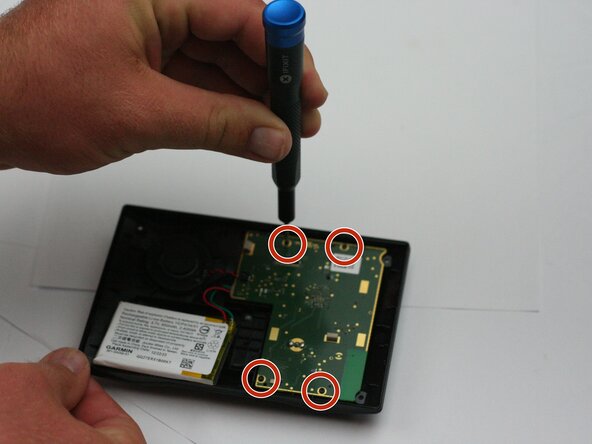
Use a T2 Torx screwdriver to remove all four screws.
 Ask FixBot
-
-
-
Insert a plastic opening tool or a thin prying pick into the seam where the front bezel meets the rear housing.
-
Gently lift the rear casing away from the front assembly, being careful not to strain the internal ribbon cable connecting the screen to the motherboard.
-
-
-
Open the ZIF (Zero Insertion Force) connector on the motherboard by flipping up the small locking tab and sliding the screen’s ribbon cable out.
-
Remove the screen.
-
-
-
-
-
Insert an opening tool underneath the battery.
-
Slowly and carefully, raise the battery to remove it from the device.
-
-
-
-
Insert an opening tool underneath the power button.
-
Slowly lift and remove the power button.
-
-




To reassemble your device, follow these instructions in reverse order.
Cancel: I did not complete this guide.
One other person completed this guide.

Team

Texas Tech, Team 16-3, Samson Spring 2026 Member of Texas Tech, Team 16-3, Samson Spring 2026
TTU-SAMSON-S26S16G3
5 Members
60 Guides authored
