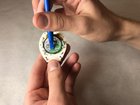
Garmin Approach S2 Battery Replacement

Emily Kovacs and
Last updated on May 7, 2024
Views: 48K
View statistics:
- Past 24 Hours:
- 8
- Past 7 Days:
- 59
- Past 30 Days:
- 288
- All Time:
- 47,509
Comments: 13
5 comments on steps, 8 guide comments.
Go to guide commentsCompleted: 7 8
7 people have marked this guide "completed." Will you be next?
8 people have marked this guide "completed." Including you — great job!
Favorites: 0 1
No one has favorited (and subscribed to) this guide. Will you be the first?
1 person has favorited (and subscribed to) this guide — and that's you!
Featured Student Guide
This guide has been the hard work of our awesome students and is found to be exceptionally cool by the iFixit staff.
What you need
Parts
Tools


Introduction
Go to step 1 ↓This guide directs the user in removing the back cover and battery. Keep in mind that this replacement requires generous prying and a consideration of tiny and delicate parts.
-
-
-
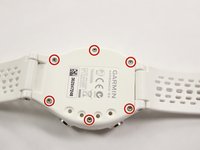
Remove the six T5 Torx 6.32mm screws securing the back cover to the watch.
 Ask FixBot
-
-
-
-
-
On the back cover use a plastic opening tool to remove the green tape retaining the battery.
-
-
-
Tool used on this step:Tweezers$4.99
-
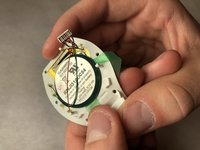
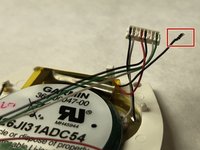
Use the ESD safe tweezers to push the connector and metal shroud out from the back of the connector.
-
Remove the third and fourth wires from the right of the connector (as seen when looking from the angle in the photo). They should be red and black respectively.
-
-
-
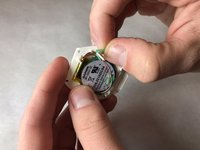
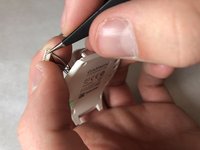
Use the ESD safe tweezers to break the adhesive between the back cover and the battery.
-
Remove the battery.
-
-








To reassemble your device, follow these instructions in reverse order.
Cancel: I did not complete this guide.
7 other people completed this guide.

Team

IUPUI, Team S4-G1, Baechle Spring 2018 Member of IUPUI, Team S4-G1, Baechle Spring 2018
IUPUI-BAECHLE-S18S4G1
3 Members
36 Guides authored
8 Guide Comments
If anyone is looking for the replacement battery for the Approach S2 it can be found here:
Replacement Battery for Garmin Approach S2
It also included the T5 Torx and Opening Tools that are needed.
Step 6 shows 2 red wires each with a free end. One of these red wires has the non free end connected to the charging circuit terminal but there is no mention in Step 6 of disconnecting this wire or where the free end is connected to.
This is a great tutorial for the S2. In my case I accidentally dropped one metal shroud (referred to in Step 5). I scoured the area on my hands and knees to no avail. Can you direct me to where I might obtain this part?or perhaps the entire connector? Thank you….
Hi, Where the !&&* Can I buy a Replacement Battery for The Garmin S2 Golf watch.????.
Gregory, I got my replacement via Amazon (UK). Battery came from Germany in about 1 week. Not cheap, but a lot cheaper than a new watch.
