Introduction
If any of your GameSir X5 Lite's Triggers are experiencing input delays, unresponsiveness, or sticking, then follow this guide to replace a trigger.
A trigger is a common component of a controller and serves as an additional input mechanism in gaming. If broken, a trigger might encounter sticking and unresponsiveness. A trigger could also have an input delay.
Before using this guide, ensure that the trigger has been properly cleaned and has no obstructions that could cause issues. A microfiber cloth can be used to clean around the trigger gently, and rubbing alcohol can be applied to small instruments, such as a cotton swab, for further cleaning.
It is important to note that there are no official trigger kits for the GameSir X5 Lite, so any replacement will require 3D-printed parts or unofficial third-party triggers.
Before beginning, ensure that the GameSir X5 Lite is not connected to any device and is not being charged during the trigger replacement.
What you need
-
-
-
Use a Phillips #00 screwdriver to remove the four 8 mm screws located on the back cover.
 Ask FixBot
-
-
-
Fully extend the controller and remove the six 5 mm Phillips #00 screws off the back of the extender.
-
-
-
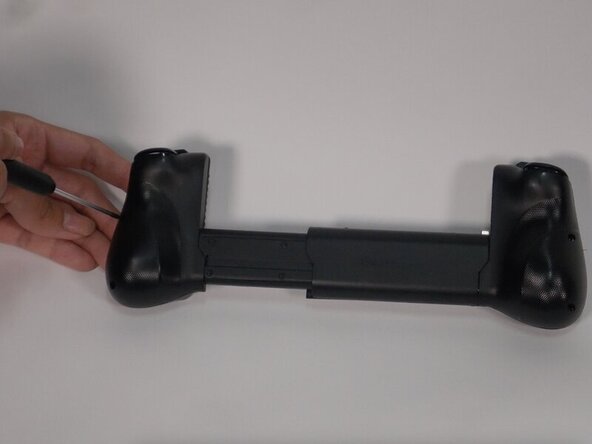
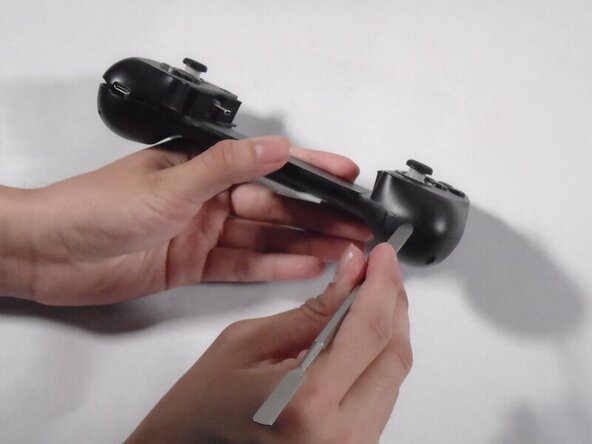
Use an opening pick to loosen the back cover to reach the end of the extender.
-
-
-
-
Pull the extender to reach the last two 5 mm screws.
-
Unscrew the two 5 mm Phillips #00 screws.
-
Remove the springs to separate the two sides of the controller by unscrewing the two 5 mm Phillis #00 screws.
-
-
-
Loosen the three 7 mm Phillips #00 screws where the triggers are located and remove one 7 mm Phillips #00 screw that sits below the joystick.
-
-






To reassemble your device, follow these instructions in reverse order.

Team

University of Texas at Arlington, Team 1-3, Aguilar Spring 2026 Member of University of Texas at Arlington, Team 1-3, Aguilar Spring 2026
UTA-AGUILAR-S26S1G3
4 Members
47 Guides authored
