Introduction
Use this guide to remove and replace the triggers on the GameSir Super Nova Controller. The plastic triggers register input for in-game actions and may need replacement if they feel loose, stick, or no longer respond properly.
• Caution: Trigger springs and small components can pop out during removal so work slowly.
• Note: Pay attention to trigger orientation for correct reassembly.
• Reminder: Reinstall springs and triggers exactly as removed to ensure proper function.
What you need
-
-
Press your fingertips into the seams of the controller and gently pry the faceplate off.
 Ask FixBot
-
-
-
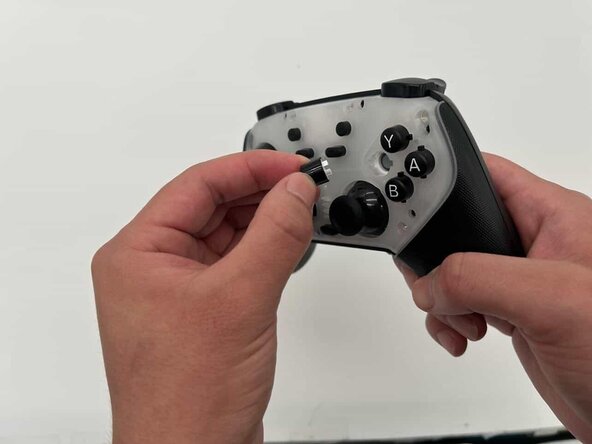
Remove the interchangeable buttons and joystick caps from the controller by pulling them up.
-
-
-
Remove the seven 7 mm screws from the outer shell using a Phillips #00 screwdriver.
-
-
-
-
Use your iFixit opening tool to disengage the clips of the back of your controller shell.
-
-
-
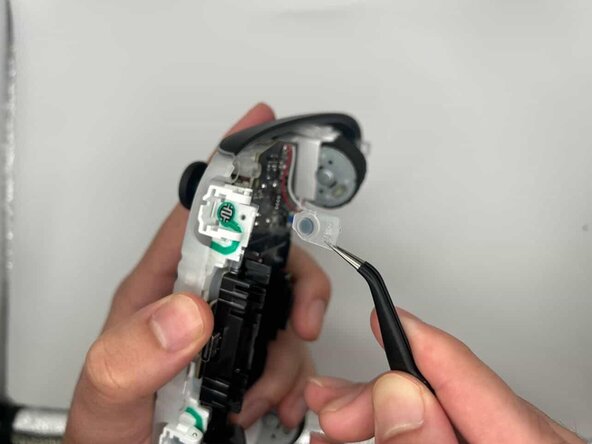
Using tweezers, carefully remove a total of two springs from the outer sides of the triggers.
-






To reassemble your device, follow these instructions in reverse order.
Cancel: I did not complete this guide.
One other person completed this guide.

Team

University of North Texas, Team 1-2, Kilpatrick Spring 2026 Member of University of North Texas, Team 1-2, Kilpatrick Spring 2026
UNT-KILPATRICK-S26S1G2
4 Members
6 Guides authored
