Introduction
Addressing charging port malfunction, this guide assists GameSir Super Nova owners in replacing their charging port. Common symptoms that necessitate this repair include: a loose or unstable charging connection, slow charging, or the controller not being recognized when placed on the charging stand.
Disconnect the controller from all power sources before beginning the repair to ensure safety.
What you need
-
-
-
Press your fingertips into the seams of the controller and gently pry the faceplate off.
 Ask FixBot
-
-
-
-
-
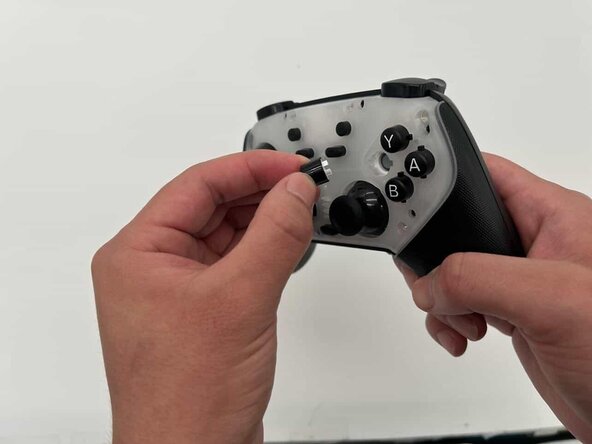
Remove the interchangeable buttons and joystick caps from the controller by pulling them up.
-
-
-
-
-
-
Remove all 7mm screws from the outer shell using a Phillips #00 screwdriver.
-
-
-
Use an iFixit opening tool to disengage the clips of the back of your controller shell.
-
-
-
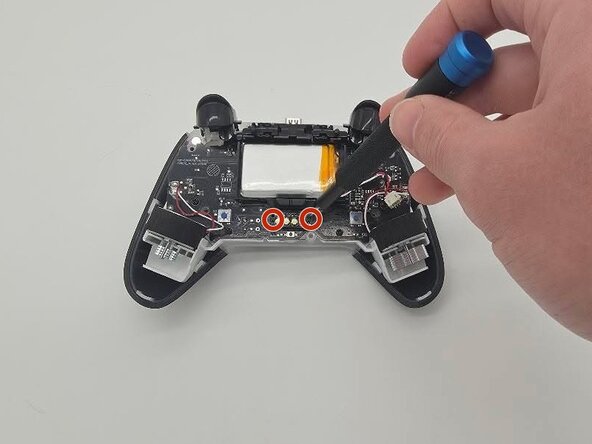
Remove the 5 mm screws on either side of the charging port using a Phillips #00 screwdriver.
-
-






To reassemble your device, follow these instructions in reverse order
Cancel: I did not complete this guide.
2 other people completed this guide.

Team

University of North Texas, Team 1-2, Kilpatrick Spring 2026 Member of University of North Texas, Team 1-2, Kilpatrick Spring 2026
UNT-KILPATRICK-S26S1G2
4 Members
72 Guides authored
