
Game Boy Pocket Power Button Replacement

Adriana Rahrig and 3 other contributors
Last updated on Mar 29, 2021
Views: 5.4K
View statistics:
- Past 24 Hours:
- 4
- Past 7 Days:
- 24
- Past 30 Days:
- 119
- All Time:
- 5,388
Comments: 1
1 comment on steps.
Completed: 1 2
1 person has marked this guide "completed." Will you be next?
2 people have marked this guide "completed." Including you — great job!
Favorites: 1 2
1 person has favorited (and subscribed to) this guide. Will you be next?
2 people have favorited (and subscribed to) this guide — including you!
Slice and Dice
The steps in this guide should be split up and made into a series of prerequisite guides.
Introduction
Go to step 1 ↓If you find your Game Boy Pocket no longer turning on with ease, use this guide to replace the faulty power button. All you need is prior knowledge using a small screwdriver and a steady hand; no special skills are required!
What you need
Tools

-
-
-
Place the Game Boy Pocket face-down on a clean, flat surface.
-
Use a Y1 tri-wing screwdriver and turn counterclockwise to remove the four external screws.
-
Use a Y1 tri-wing screwdriver and turn counterclockwise to remove the two screws inside the battery compartment.
 Ask FixBot
-
-
-
Place your hands on the front and back covers of the Game Boy Pocket, and carefully separate the device.
-
-
-
-
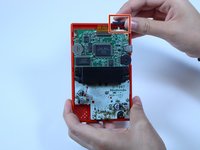
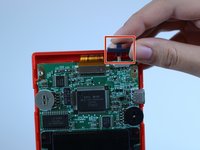
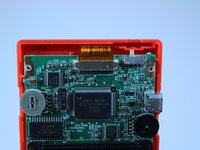
Use your fingers to remove the grey power button to the right of the ribbon cable.
-
-


To reassemble your device, follow these instructions in reverse order.
Cancel: I did not complete this guide.
One other person completed this guide.

Team

USF Tampa, Team 1-1, Leahy Fall 2014 Member of USF Tampa, Team 1-1, Leahy Fall 2014
USFT-LEAHY-F14S1G1
4 Members
60 Guides authored
