
GPD WIN 4 (2023) Battery Replacement

Benjamin | Allott Technology and one other contributor
Last updated on Jul 8, 2026
Views: 945
View statistics:
- Past 24 Hours:
- 7
- Past 7 Days:
- 57
- Past 30 Days:
- 313
- All Time:
- 945
Comments: 0
No one has left comments on this guide. Will you be first?
Go to guide commentsCompleted: 1 2
1 person has marked this guide "completed." Will you be next?
2 people have marked this guide "completed." Including you — great job!
Favorites: 0 1
No one has favorited (and subscribed to) this guide. Will you be the first?
1 person has favorited (and subscribed to) this guide — and that's you!
Community-Contributed Guide
An awesome member of our community made this guide. It was not created by iFixit staff.
Introduction
Go to step 1 ↓I recently encountered a spicy pillow (swelling battery) in my GPD WIN 4 and it needed replacing,
It was a bit tricky at first but with a prying tool and a size 00 Phillips screwdriver (I used the PH00 bit from the iFixit kit) it was relatively easy
What you need

-
-
-
From the bottom of the device (the side with a single USB-C port and not with the Occulink port) pry off the silver band. this is the only glued part.
 Ask FixBot
-
-
-
Remove the 2 screws on the right hand side of the device (if the screen is facing away from you) and the 6 screws from the underside.
-
NOTE: if the battery swelling is significant this will pop open on its own, please take care.
-
-
-
Using your pry tool, open the bottom and top on the case with the screen face down, there are 2 cables, one on the left and one on the right, one is for Wi-Fi the other is the back shell buttons. these will need to be dissconnected.
-
-
-
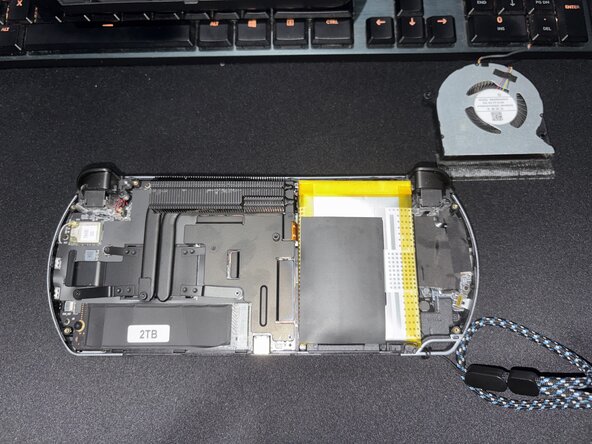
There are 2 screws holding the fan in, these have a wide head, and are located on the left and right of the fan, and the cable towards to bottom.
-
The fan also has a plastic tape/glued sheet to direct air though the heatsink, you can leave it on the fan and pry it off the heatsink using the fan.
-
-
-
there are 3 screws in the main heatsink, left, top and bottom that have to come out.
-
Once the screws are removed the heatsink can come out exposing the battery connector.
-
-
-
-
Next is the hard part, disconnect the battery connector, like a little Lego, then carefully pry the battery from the case, this has double sided tape with no removal strips. I used an old sim carrier card (the smooth side)
-
Once the battery is out, this is the perfect opportunity to replace the SSD and remove dust from the fan and heatsink.
-
-
-
Now the home strech
-
Install the new battery, this can be tricky as some 3rd party batteries don't line up 100%, my battery ribbon has a slight twist in it to get the angle right.
-
Now reverse the order of operations
-
reinstall the heatsink and 3 screws, careful not to misalign the thermal pads
-
reinstall the fan with it's 2 screws, ensure the tape is on the heatsink and fan and the cable is connected
-
Connect the back shell, and the 2 cables, Wi-Fi and buttons
-
snap closed, install the 8 screws, 2 from the bottom and 6 on the back
-
reattach (if the glue works or apply new glue) the silver edging strip
-
-




To reassemble your device, follow these instructions in reverse order.
Cancel: I did not complete this guide.
One other person completed this guide.

