Introduction
Is your back case cover scratched on your Fujifilm Finepix S1800? It may be time to replace the cover. This guide will walk you through each step on replacing the back case cover.
What you need
-
-
-
Unscrew the four 4mm screws on the left-hand side of the camera with the JIS #1 screwdriver.
 Ask FixBot
-
-
-
Unscrew the four 4mm screws on the right-hand side of the camera with the JIS #1 screwdriver.
-
-
-
-
Unscrew the three 4mm screws on the bottom of the camera with the JIS #1 screwdriver.
-
-
-
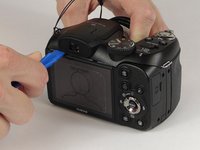
Take the plastic opening tool and place it in the space between the top of the screen and the top of the camera.
-
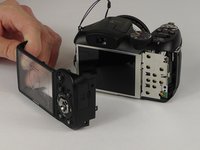
The cover will pop out.
-
-


To reassemble your device, follow these instructions in reverse order.
Cancel: I did not complete this guide.
One other person completed this guide.

Team

USF Tampa, Team 8-6, Eyestone Spring 2017 Member of USF Tampa, Team 8-6, Eyestone Spring 2017
USFT-EYESTONE-S17S8G6
4 Members
30 Guides authored
