Free Shipping on Domestic Orders $75+

Fujifilm FinePix T500 Lens Gears Replacement

What you need

    1. Fujifilm FinePix T500 Lens Gears Replacement, LCD Screen: step 1, image 1 of 3 Fujifilm FinePix T500 Lens Gears Replacement, LCD Screen: step 1, image 2 of 3 Fujifilm FinePix T500 Lens Gears Replacement, LCD Screen: step 1, image 3 of 3
      • Unscrew the six 3.5mm Philips head from the outer casing.

      Ask FixBot
      Add Comment

    2. Fujifilm FinePix T500 Lens Gears Replacement: step 2, image 1 of 3 Fujifilm FinePix T500 Lens Gears Replacement: step 2, image 2 of 3 Fujifilm FinePix T500 Lens Gears Replacement: step 2, image 3 of 3
      • Open the battery compartment and remove the battery.

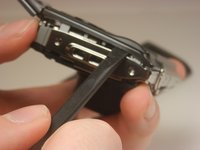
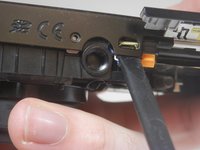
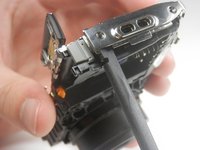
      • Carefully pry the front half of the casing away from the camera.

      • Pay close attention to the sensor cover—a small piece of translucent plastic—as it may fall out of place. If it does, place it back in its original position.

      Ask FixBot

      Add Comment

    3. Fujifilm FinePix T500 Lens Gears Replacement: step 3, image 1 of 2 Fujifilm FinePix T500 Lens Gears Replacement: step 3, image 2 of 2
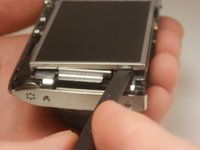
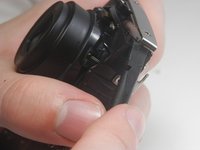
      • Pry the back half of the casing from the camera.

      • Be careful when maneuvering the camera without the casing on as the LCD screen is not fastened to anything.

      Ask FixBot

      Add Comment

    4. Fujifilm FinePix T500 Lens Gears Replacement: step 4, image 1 of 3 Fujifilm FinePix T500 Lens Gears Replacement: step 4, image 2 of 3 Fujifilm FinePix T500 Lens Gears Replacement: step 4, image 3 of 3
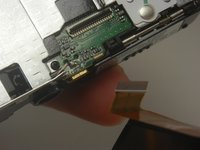
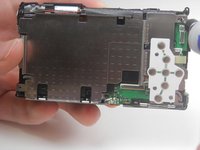
      • Lift the LCD screen out of the camera.

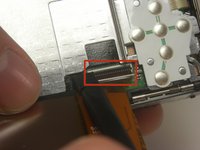
      • Locate the tab securing the ribbon cable that connects the screen to the motherboard. Using a spudger, gently lift the tab to release the ribbon. Carefully disconnect the screen from the motherboard.

      Ask FixBot
      Add Comment

    1. Fujifilm FinePix T500 Lens Gears Replacement, Lens: step 5, image 1 of 1
      • Unscrew the 3.5 mm Phillips head screw from the corner of the camera.

      Ask FixBot
      Add Comment

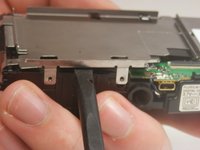
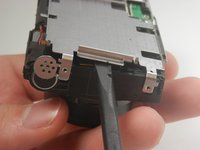
    2. Fujifilm FinePix T500 Lens Gears Replacement: step 6, image 1 of 3 Fujifilm FinePix T500 Lens Gears Replacement: step 6, image 2 of 3 Fujifilm FinePix T500 Lens Gears Replacement: step 6, image 3 of 3
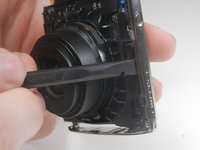
      • Pry off the center casing of the camera. Separate the top and side sections individually before fully removing the casing.

      Ask FixBot

      Add Comment

    3. Fujifilm FinePix T500 Lens Gears Replacement: step 7, image 1 of 3 Fujifilm FinePix T500 Lens Gears Replacement: step 7, image 2 of 3 Fujifilm FinePix T500 Lens Gears Replacement: step 7, image 3 of 3
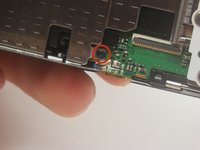
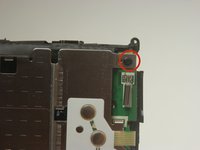
      • Unscrew the two 3.5 mm Phillips head screws in the metal plate.

      Ask FixBot

      Add Comment

    4. Fujifilm FinePix T500 Lens Gears Replacement: step 8, image 1 of 2 Fujifilm FinePix T500 Lens Gears Replacement: step 8, image 2 of 2
      • Pry the metal plate out using the spudger.

      Ask FixBot

      Add Comment

    5. Fujifilm FinePix T500 Lens Gears Replacement: step 9, image 1 of 3 Fujifilm FinePix T500 Lens Gears Replacement: step 9, image 2 of 3 Fujifilm FinePix T500 Lens Gears Replacement: step 9, image 3 of 3
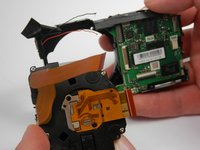
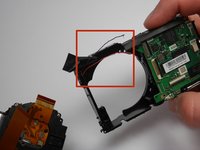
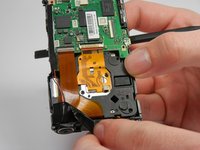
      • Peel back the strip of black tape to reveal a red and black wire.

      • Detach the orange ribbon by gently pulling on it.

      • Detach the golden ribbon by gently lifting it with the spudger.

      Ask FixBot
      Add Comment

    6. Fujifilm FinePix T500 Lens Gears Replacement: step 10, image 1 of 2 Fujifilm FinePix T500 Lens Gears Replacement: step 10, image 2 of 2
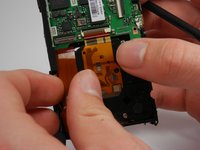
      • The lens should now be free to simply be pushed out of its socket.

      • The black and red wires that were exposed previously may be in the way of removing the lens and may break. If they do, you will need to solder these wires back into place upon reassembly.

      Ask FixBot
      Add Comment
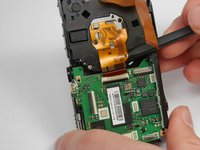
    1. Fujifilm FinePix T500 Lens Gears Replacement, Lens Gears: step 11, image 1 of 1
      • Use a Phillips #00 screwdriver to remove four 3.5 mm screws from the corners of the internal plate.

      Ask FixBot

      Add Comment

    2. Fujifilm FinePix T500 Lens Gears Replacement: step 12, image 1 of 1
      • Slide the rectangular plastic frame to the side. You'll find a spring attaches the frame to the rest of the lens casing.

      • Disconnect the plastic frame from the spring.

      Ask FixBot

      Add Comment

    3. Fujifilm FinePix T500 Lens Gears Replacement: step 13, image 1 of 3 Fujifilm FinePix T500 Lens Gears Replacement: step 13, image 2 of 3 Fujifilm FinePix T500 Lens Gears Replacement: step 13, image 3 of 3
      Tool used on this step:
      Tweezers
      $4.99
      Buy
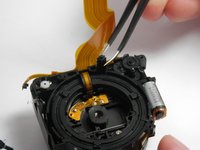
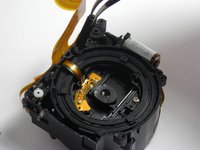
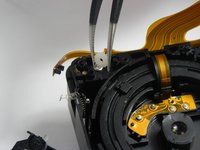
      • The white and the black gears of the lens unit are responsible for the lens movement.

      • Using tweezers, adjust and replace these gears as needed. The white gear should be integrated with the rest of the unit. The black gear should occupy the entirety of its cavity.

      Ask FixBot

      Add Comment

Conclusion

To reassemble your device, follow these instructions in reverse order.

Cancel: I did not complete this guide.

One other person completed this guide.

Brian Lasher

Member since: 01/16/15

328 Reputation

3 Guides authored

Team

USF Tampa, Team 19-3, Blackwell Winter 2015 Member of USF Tampa, Team 19-3, Blackwell Winter 2015

USFT-BLACKWELL-W15S19G3

4 Members

35 Guides authored

1 Guide Comment

where can i get these gear’s? my camera is not opening its shutter, kindly let me know.

prabhu mandhar - Reply Share

Add Comment

View Statistics:

Past 24 Hours: 2

Past 7 Days: 6

Past 30 Days: 38

All Time: 1,315