
Fujifilm FinePix S4200 Viewfinder Replacement

Melissa Burciaga and 5 other contributors
Last updated on Dec 22, 2015
Views: 1.5K
View statistics:
- Past 24 Hours:
- 2
- Past 7 Days:
- 14
- Past 30 Days:
- 79
- All Time:
- 1,452
Comments: 0
No one has left comments on this guide. Will you be first?
Go to guide commentsCompleted: 2 3
2 people have marked this guide "completed." Will you be next?
3 people have marked this guide "completed." Including you — great job!
Favorites: 0 1
No one has favorited (and subscribed to) this guide. Will you be the first?
1 person has favorited (and subscribed to) this guide — and that's you!
Missing Prerequisites
This guide is missing information on how to start the process. Make a prerequisite guide!
Introduction
Go to step 1 ↓To replace the viewfinder you will need to perform the LCD prerequisite. The viewfinder should be replaced if your camera does not focus or your photos lack composition.
What you need
Tools


-
-
-
Turn the camera off.
-
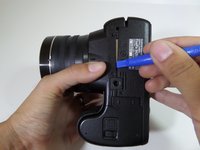
Turn the camera upside down so that the battery compartment is showing.
 Ask FixBot
-
-
-
Remove the three 4 mm screws from the bottom of the camera with a Phillips #000 screwdriver.
-
-
-
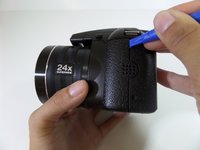
Rotate camera to the side where the speaker ports are located.
-
Remove the three 4 mm screws with a Phillips #000 screwdriver.
-
-
-
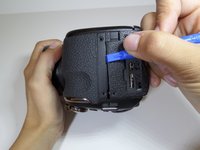
Turn the camera to the opposite side where the HDMI port is located.
-
Remove all five 4 mm screws with a Phillips #000 screwdriver.
-
-
-
Utilize the plastic opening tool to pry in between the back casing of the camera from the front casing.
-
Continue this motion around the camera to create a wedge between the front and back casing of the camera.
-
-
-
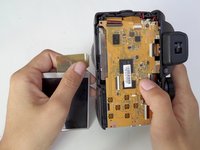
Remove the two 4 mm screws that hold the motherboard and metal plate in place.
-
-
-
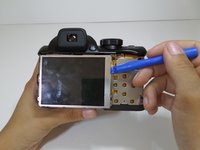
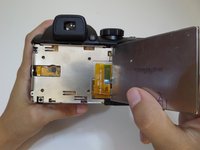
Utilize the plastic opening tool to gently lift the LCD screen away from the metal plate.
-
Flip over LCD screen so that the left side of the metal plate is visible.
-
-
-
Use a Phillips #000 screwdriver to remove the two 4mm screws that are located on the metal plate under the LCD screen.
-
-
-
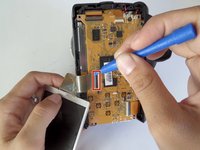
Pull back the small black latch connecting the orange ribbon cable to the motherboard.
-
Gently remove the LCD screen from the motherboard.
-
-
-
-
-
-
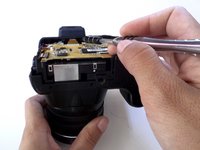
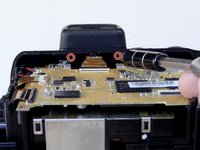
Remove the two 4 mm screws with a Phillips 000 screwdriver under the viewfinder.
-
-
-
Remove the two 3mm screws surrounding the viewfinder with a Phillips 000 screwdriver.
-
-
-
Using the plastic opening tool, pull down the small black latch to remove the orange ribbon from the mother board.
-
-










To reassemble your device, follow these instructions in reverse order.
Cancel: I did not complete this guide.
2 other people completed this guide.

Team

CSU Fullerton, Team 1-4, Bruce Fall 2015 Member of CSU Fullerton, Team 1-4, Bruce Fall 2015
CSUF-BRUCE-F15S1G4
4 Members
36 Guides authored
