Free Shipping on Domestic Orders $75+

Fujifilm FinePix HS30EXR Discharge Flash Replacement

What you need

    1. Fujifilm FinePix HS30EXR Discharge Flash Replacement, Frame: step 1, image 1 of 1
      • Flip the camera so that the bottom is facing upwards.

      • With the Phillips #00 screwdriver, remove all four screws.

      Ask FixBot

      Add Comment

    2. Fujifilm FinePix HS30EXR Discharge Flash Replacement: step 2, image 1 of 1
      • Flip the camera so that it is now on the right side.

      • With the Phillips #00 screwdriver, remove all four screws.

      Ask FixBot

      Add Comment

    3. Fujifilm FinePix HS30EXR Discharge Flash Replacement: step 3, image 1 of 1
      • Flip the camera so that it is now on the left side.

      • Move or remove the flap hiding the camera ports.

      • With the Phillips #00 screwdriver, remove all screws.

      Ask FixBot

      Add Comment

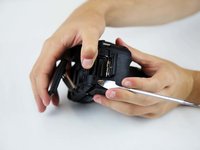
    4. Fujifilm FinePix HS30EXR Discharge Flash Replacement: step 4, image 1 of 1
      • Flip the camera so that it is now on the top side.

      • With a spudger, pry off the highlighted metal piece of the camera.

      Ask FixBot

      Add Comment

    5. Fujifilm FinePix HS30EXR Discharge Flash Replacement: step 5, image 1 of 1
      • With the Phillips #00 screwdriver, remove all four screws.

      Ask FixBot

      Add Comment

    6. Fujifilm FinePix HS30EXR Discharge Flash Replacement: step 6, image 1 of 1
      • Pull the LCD screen up and out of the way.

      • With the Phillips #00 screwdriver, remove the screws.

      Ask FixBot

      Add Comment

    7. Fujifilm FinePix HS30EXR Discharge Flash Replacement: step 7, image 1 of 2 Fujifilm FinePix HS30EXR Discharge Flash Replacement: step 7, image 2 of 2
      • With a spudger, pry off the frame.

      • If the frame does not easily dislodge after a few attempts, ensure that all screws are taken out.

      Ask FixBot

      Add Comment

    1. Fujifilm FinePix HS30EXR Discharge Flash Replacement, Motherboard: step 8, image 1 of 1
      • Slowly and carefully pull the frame away to have a better view of the inside.

      Ask FixBot

      Add Comment

    2. Fujifilm FinePix HS30EXR Discharge Flash Replacement: step 9, image 1 of 1
      • Peel back (or off) the black tape to expose more of the inside of the camera.

      • Flip the white switch of the highlighted chamber up, and that should unlock the ribbon cable from its compartment.

      • To see if this worked, gently pull the ribbon cable out of the compartment. It should come out without force.

      Ask FixBot

      Add Comment

    3. Fujifilm FinePix HS30EXR Discharge Flash Replacement: step 10, image 1 of 1
      • Disconnect the ribbon cable.

      Ask FixBot

      Add Comment

    4. Fujifilm FinePix HS30EXR Discharge Flash Replacement: step 11, image 1 of 1
      • With the Phillips #00 screwdriver, remove all five screws.

      • Remove the metal casing.

      Ask FixBot

      Add Comment

    5. Fujifilm FinePix HS30EXR Discharge Flash Replacement: step 12, image 1 of 1
      • With the Phillips #00 screwdriver, remove all screws.

      Ask FixBot

      Add Comment

    6. Fujifilm FinePix HS30EXR Discharge Flash Replacement: step 13, image 1 of 1
      • Ensure the four ribbon cables are disconnected from the motherboard.

      • Be aware, one is under the black tape.

      Ask FixBot

      Add Comment

    7. Fujifilm FinePix HS30EXR Discharge Flash Replacement: step 14, image 1 of 1
      • Begin desoldering all four highlighted areas.

      Ask FixBot

      Add Comment

    8. Fujifilm FinePix HS30EXR Discharge Flash Replacement: step 15, image 1 of 1
      • Remove the motherboard.

      Ask FixBot

      Add Comment

    1. Fujifilm FinePix HS30EXR Discharge Flash Replacement, Discharge Flash: step 16, image 1 of 1
      • Remove the discharge flash by giving it a light tug. It is held in place with glue.

      • Replace the old flash bulb with a new one, and begin the reconstruction of the device.

      Ask FixBot

      Add Comment

Conclusion

To reassemble your device, follow these instructions in reverse order.

Cancel: I did not complete this guide.

One other person completed this guide.

Haden Calvert

Member since: 10/22/18

103 Reputation

1 Guide authored

Team

Baylor, Team S1-G2, Williams Fall 2018 Member of Baylor, Team S1-G2, Williams Fall 2018

BU-WILLIAMS-F18S1G2

4 Members

66 Guides authored

0 Guide Comments

Add Comment

View Statistics:

Past 24 Hours: 0

Past 7 Days: 10

Past 30 Days: 36

All Time: 1,156