Free Shipping on Domestic Orders $75+

Fujifilm Fine S1800 LCD Screen Replacement

What you need

    1. Fujifilm Fine S1800 LCD Screen Replacement, Back Cover Assembly: step 1, image 1 of 1
      • Unscrew the four 4mm screws on the left-hand side of the camera with the JIS #1 screwdriver.

      Ask FixBot

      Add Comment

    2. Fujifilm Fine S1800 LCD Screen Replacement: step 2, image 1 of 1
      • Unscrew the four 4mm screws on the right-hand side of the camera with the JIS #1 screwdriver.

      Ask FixBot

      Add Comment

    3. Fujifilm Fine S1800 LCD Screen Replacement: step 3, image 1 of 1
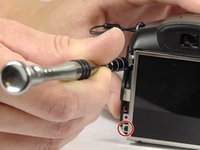
      • Unscrew the three 4mm screws on the bottom of the camera with the JIS #1 screwdriver.

      Ask FixBot

      Add Comment

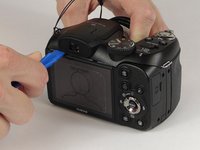
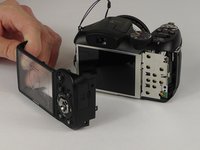
    4. Fujifilm Fine S1800 LCD Screen Replacement: step 4, image 1 of 2 Fujifilm Fine S1800 LCD Screen Replacement: step 4, image 2 of 2
      • Take the plastic opening tool and place it in the space between the top of the screen and the top of the camera.

      • The cover will pop out.

      • You may have to work the back cover from different sides to get it to pop off.

      Ask FixBot

      Add Comment

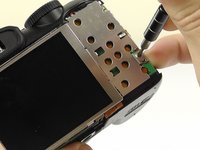
    1. Fujifilm Fine S1800 LCD Screen Replacement, LCD Screen: step 5, image 1 of 2 Fujifilm Fine S1800 LCD Screen Replacement, LCD Screen: step 5, image 2 of 2
      • Remove the three 2 mm screws from the back cover plate with the Phillips #000 screwdriver.

      • Gently lift the back cover away from the device.

      • Do not pull or yank free. The LCD screen is connected to the motherboard via a small ribbon cable.

      Ask FixBot

      Add Comment

    2. Fujifilm Fine S1800 LCD Screen Replacement: step 6, image 1 of 1
      • Move the lever to disconnect the ribbon cable from the circuit board.

      • Do not rip the fragile micro ribbon cable.

      Ask FixBot

      Add Comment

    3. Fujifilm Fine S1800 LCD Screen Replacement: step 7, image 1 of 1
      • Gently remove the LCD screen.

      • Do not touch the screen directly.

      Ask FixBot

      Add Comment

Conclusion

To reassemble your device, follow these instructions in reverse order.

Cancel: I did not complete this guide.

Ryan Rockford

Member since: 02/15/17

618 Reputation

5 Guides authored

Team

USF Tampa, Team 8-6, Eyestone Spring 2017 Member of USF Tampa, Team 8-6, Eyestone Spring 2017

USFT-EYESTONE-S17S8G6

4 Members

30 Guides authored

0 Guide Comments

Add Comment

View Statistics:

Past 24 Hours: 0

Past 7 Days: 8

Past 30 Days: 24

All Time: 856