Free Shipping on Domestic Orders $75+

Fossil JR-8997 Battery Replacement

What you need

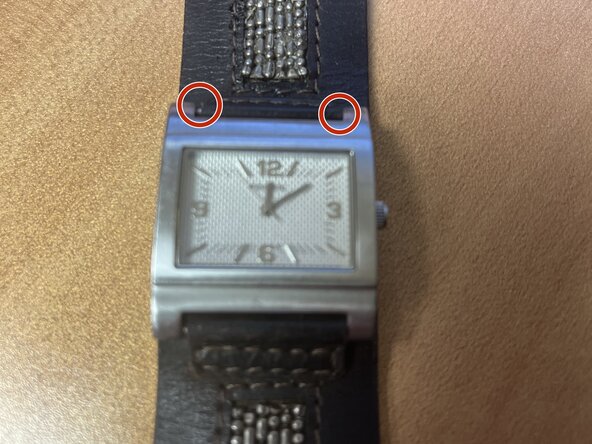
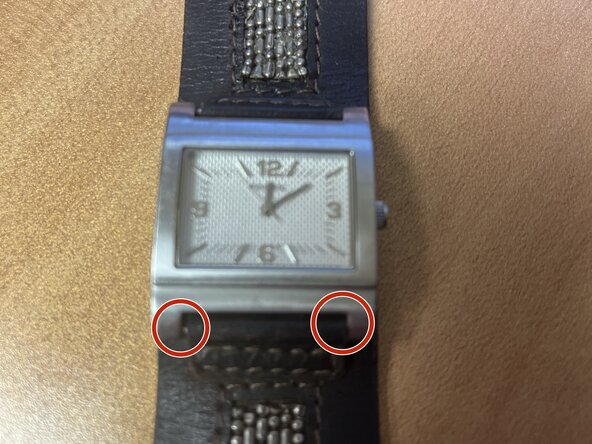
    1. Fossil JR-8997 Battery Replacement, Take out springbars: step 1, image 1 of 2 Fossil JR-8997 Battery Replacement, Take out springbars: step 1, image 2 of 2
      • Using a springbar tool take the first and then the second springbar

      Ask FixBot

      Add Comment

    2. Fossil JR-8997 Battery Replacement, Now the band is separated from the watch: step 2, image 1 of 1
      • Now you can access the case back to work on the watch proper

      Ask FixBot

      Add Comment

    1. Fossil JR-8997 Battery Replacement, Remove caseback: step 3, image 1 of 1
      • At the top right corner of the case there is a lip used for opening the caseback with a caseback opening tool

      Ask FixBot

      Add Comment

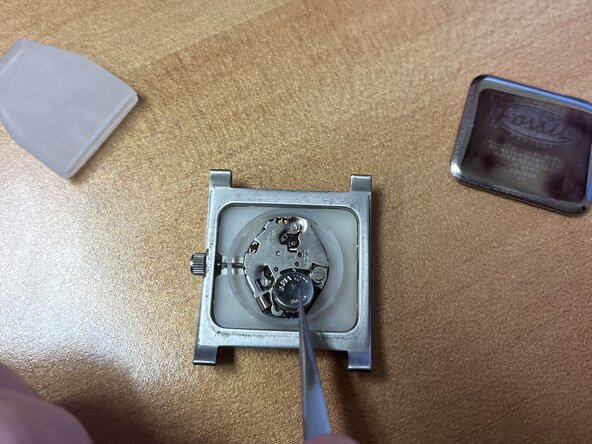
    2. Fossil JR-8997 Battery Replacement, Take out old battery: step 4, image 1 of 1
      • Using tweezers carefully take out the old battery

      Ask FixBot

      Add Comment

    3. Fossil JR-8997 Battery Replacement, Put  in new battery: step 5, image 1 of 1
      • Insert the new 377 cell battery into the watch

      Ask FixBot

      Add Comment

Conclusion

To reassemble your device, follow these instructions in reverse order.

Cancel: I did not complete this guide.

freecityof

Member since: 06/09/25

8,431 Reputation

27 Guides authored

0 Guide Comments

Add Comment

View Statistics:

Past 24 Hours: 2

Past 7 Days: 4

Past 30 Days: 25

All Time: 100