Free Shipping on Domestic Orders $75+

Flydigi Direwolf 2 Rear Case Replacement

What you need

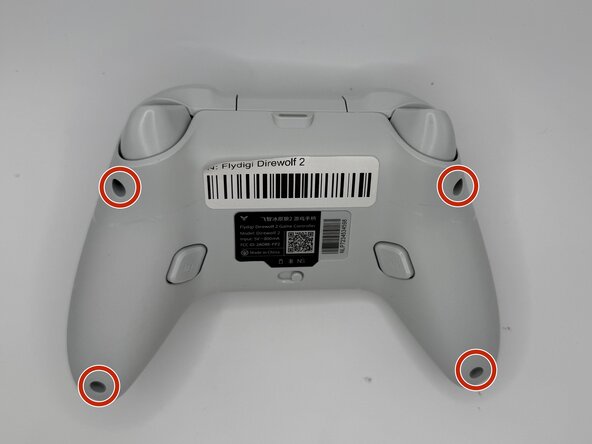
  1. Flydigi Direwolf 2 Rear Case Replacement, Rear Case: step 1, image 1 of 1
    • Remove the four 10 mm-long Phillips 10mm screws securing the rear case to the front case.

    Ask FixBot

    Add Comment

  2. Flydigi Direwolf 2 Rear Case Replacement: step 2, image 1 of 3 Flydigi Direwolf 2 Rear Case Replacement: step 2, image 2 of 3 Flydigi Direwolf 2 Rear Case Replacement: step 2, image 3 of 3
    • Insert an opening pick into the seam between the rear and front case.

    • Slide the pick around the perimeter of the controller until the two halves of the controller release.

    • Remove the rear case.

    Ask FixBot

    Add Comment

Conclusion

To reassemble your device, follow these instructions in reverse order.

Cancel: I did not complete this guide.

Connor Bassolino

Member since: 03/29/22

24,900 Reputation

125 Guides authored

0 Guide Comments

Add Comment

View Statistics:

Past 24 Hours: 0

Past 7 Days: 8

Past 30 Days: 33

All Time: 33