Introduction
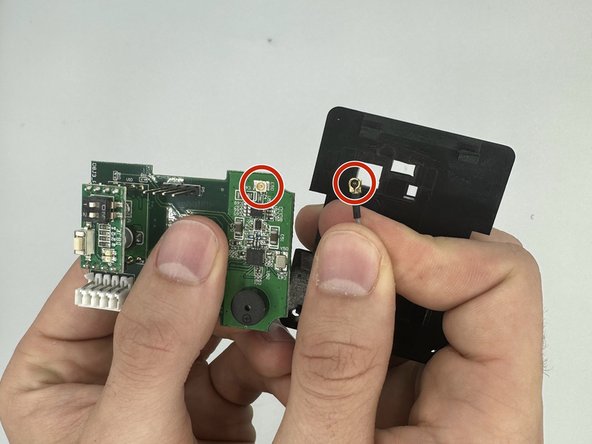
The antenna wire could have come out and disconnected from the motherboard. Carefully connect the socket on the motherboard to the connector on the wire.
What you need
-
-
-
On the back of the remote, locate the antenna box labeled in red.
 Ask FixBot
-
-
-
On either side of the box, squeeze the clips and pull up to release the antenna box away from its socket.
-
-
-
-
Unscrew the two 2.5 mm Phillips #1 screws with a screwdriver and carefully remove the front plate.
-
-
-
Once you remove it, you will see a wire that is connected to the antenna, and a motherboard.
-
-
-
Locate the brass colored socket and the end of the wire and carefully connect them together.
-
-



To reassemble your device, follow these instructions in reverse order.

Team

University of North Texas, Team 3-3, Saru Jimmy Spring 2023 Member of University of North Texas, Team 3-3, Saru Jimmy Spring 2023
UNT-SARU JIMMY-S23S3G3
4 Members
72 Guides authored
