Free Shipping on Domestic Orders $75+

Flashforge Finder 2 Fan Cleaning or Replacement

What you need

    1. Flashforge Finder 2 Fan Cleaning or Replacement, Work safely: step 1, image 1 of 1
      • Shut down the back switch and disconnect the printer power supply

      • If used recently wait for the extruder to cool down

      Ask FixBot

      Add Comment

    2. Flashforge Finder 2 Fan Cleaning or Replacement, Remove extruder cover: step 2, image 1 of 3 Flashforge Finder 2 Fan Cleaning or Replacement, Remove extruder cover: step 2, image 2 of 3 Flashforge Finder 2 Fan Cleaning or Replacement, Remove extruder cover: step 2, image 3 of 3
      • Remove the three screws on the extruder top with a 2.5 Allen key or an appropriate screwdriver bit

      • Gently lift up the extruder cover

      • Pay attention to the flat cable while lifting the cover

      Ask FixBot

      Add Comment

    3. Flashforge Finder 2 Fan Cleaning or Replacement, Disconnect the fan: step 3, image 1 of 1
      • Using a spudger, disconnect the fan connector

      • Route the cable to free it

      Ask FixBot

      Add Comment

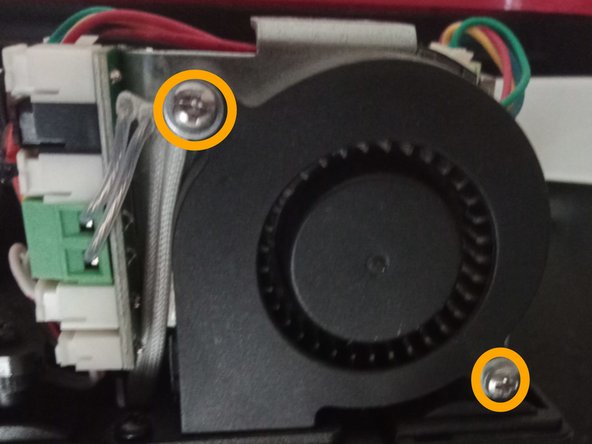
    4. Flashforge Finder 2 Fan Cleaning or Replacement, Unscrew the fan: step 4, image 1 of 2 Flashforge Finder 2 Fan Cleaning or Replacement, Unscrew the fan: step 4, image 2 of 2
      • Remove the two Phillips screw holding the fan

      Ask FixBot

      Add Comment

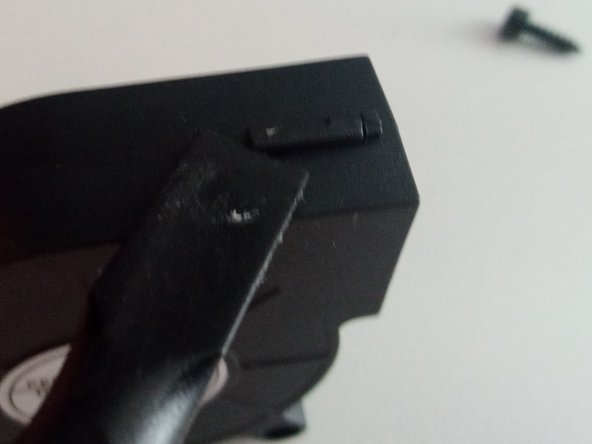
    5. Flashforge Finder 2 Fan Cleaning or Replacement, (Optional) Disassemble the fan: step 5, image 1 of 2 Flashforge Finder 2 Fan Cleaning or Replacement, (Optional) Disassemble the fan: step 5, image 2 of 2
      • The fan can now be removed from the extruder. If you need to replace it, just follow the steps in reverse order with the new fan

      • If you are cleaning the fan, release the three clips holding it together with a spudger

      Ask FixBot

      Add Comment

    6. Flashforge Finder 2 Fan Cleaning or Replacement, Clean the fan: step 6, image 1 of 1
      • Using compressed air and a brush, clean the fan from dust and debris

      Ask FixBot

      Add Comment

Conclusion

To reassemble your device, follow these instructions in reverse order.

Cancel: I did not complete this guide.

dinoo_fixit

Member since: 03/22/22

1,801 Reputation

4 Guides authored

0 Guide Comments

Add Comment

View Statistics:

Past 24 Hours: 0

Past 7 Days: 8

Past 30 Days: 29

All Time: 412