
Fitbit Surge Touchscreen Sensor Replacement

Angela Pitts and 2 other contributors
Last updated on Oct 10, 2017
Views: 3.5K
View statistics:
- Past 24 Hours:
- 4
- Past 7 Days:
- 24
- Past 30 Days:
- 103
- All Time:
- 3,487
Comments: 5
5 guide comments.
Go to guide commentsCompleted: 7 8
7 people have marked this guide "completed." Will you be next?
8 people have marked this guide "completed." Including you — great job!
Favorites: 0 1
No one has favorited (and subscribed to) this guide. Will you be the first?
1 person has favorited (and subscribed to) this guide — and that's you!
Introduction
Go to step 1 ↓Is your touchscreen not working? The touchscreen sensor may need to be replaced. Read this guide to learn how to replace the touchscreen sensor, but keep in mind that you will need to cut the wristband in order to complete this repair and the band cannot be reattached.
What you need
Tools


-
-
-
Unscrew all four black 3 mm screws on the underside of the watch using a T5 screwdriver.
 Ask FixBot
-
-
-
Use an X-Acto knife to cut the band above, on either side, and in between the 2 screws.
-
Note: Part of the band is hard plastic.
-
Caution: Once the band is cut it cannot be reattached.
-
-
-
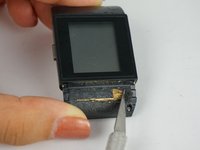
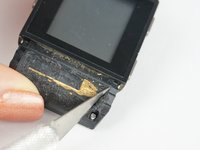
Scrape away the glue beneath the hard shell portion of the band to reveal the GPS.
-
-
-
Use a PH000 screw head to undo the newly revealed silver 4 mm Phillips screws that were hidden beneath the glue.
-
-
-
Using a metal spudger, push down on the plastic gray square clamps on the underside of the device to dislodge the whole silver backing.
-
Note: the buttons will also come off.
-
-
-
-
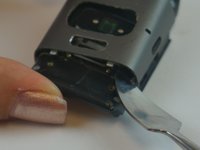
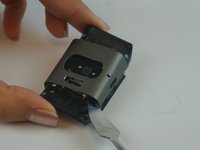
Use a thin tool to pry the the device apart by lodging it between the clock face and back side of the device.
-
Note: A spudger may not be thin enough to fit in the seam of the device. We used the 6 inch metal ruler from the Pro Tech Toolkit.
-
-
-
Remove the touchscreen sensor using a spudger or your fingers.
-
Note: In this photo we removed the metal cover on the main PCB, but you do not need to remove it for this guide.
-
-






To reassemble your device, follow these instructions in reverse order. Keep in mind that the wristband will need to be cut for this repair and it cannot be reattached.
Cancel: I did not complete this guide.
7 other people completed this guide.

Team

USF Tampa, Team 1-3, Leahy Fall 2016 Member of USF Tampa, Team 1-3, Leahy Fall 2016
USFT-LEAHY-F16S1G3
3 Members
48 Guides authored
5 Guide Comments
Is there a company that will perform this fix for me?
Where can I get a replacement sensor?
Isn’t any step missing in that instruction ?
Removing sensor will solve the issue ? How about adding new one ?
Is anyway I can buy the bus
