
Fitbit Alta HR Battery Replacement

Wendy Sato and one other contributor
Last updated on Jan 12, 2023
Views: 3.9K
View statistics:
- Past 24 Hours:
- 2
- Past 7 Days:
- 32
- Past 30 Days:
- 168
- All Time:
- 3,854
Comments: 4
2 comments on steps, 2 guide comments.
Go to guide commentsCompleted: 4 5
4 people have marked this guide "completed." Will you be next?
5 people have marked this guide "completed." Including you — great job!
Favorites: 0 1
No one has favorited (and subscribed to) this guide. Will you be the first?
1 person has favorited (and subscribed to) this guide — and that's you!
Needs More Images
A few more images would make this guide's procedures crystal clear.
Community-Contributed Guide
An awesome member of our community made this guide. It was not created by iFixit staff.
Introduction
Go to step 1 ↓This is a guide to replace the battery in the Fitbit Alta HR fitness tracker.
What you need


-
-
-
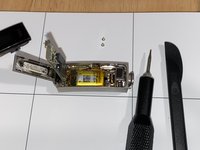
Use a spudger to disconnect the cable that connects the heart rate monitor to the motherboard.
-
-
-
Use a hex 0.7 screwdriver to remove the screws from the motherboard.
-
-
-
-
Use a spudger to lift the battery.
-
When the battery is lifted, the connected components (display, motherboard, battery) will come out.
-
-
-
Use a soldering iron to desolder the two battery contacts from the motherboard.
-
-
-
Ensure positive and negative wires are in the correct positions. There are + and – signs on the motherboard. Red is positive. Black is negative.
-
Use a soldering iron and lead-free solder to solder the new battery to the motherboard.
-


 Ask FixBot



To reassemble your device, follow these instructions in reverse order.
Cancel: I did not complete this guide.
4 other people completed this guide.

2 Guide Comments
No work no on
Thanks 🙏🏻
