
Fast Fix FOB Battery Replacement

jtorman@udel.edu and 2 other contributors
Last updated on Jul 26, 2024
Views: 1.3K
View statistics:
- Past 24 Hours:
- 5
- Past 7 Days:
- 39
- Past 30 Days:
- 160
- All Time:
- 1,328
Comments: 0
No one has left comments on this guide. Will you be first?
Go to guide commentsCompleted: 1 2
1 person has marked this guide "completed." Will you be next?
2 people have marked this guide "completed." Including you — great job!
Favorites: 4 5
4 people have favorited (and subscribed to) this guide. Will you be next?
5 people have favorited (and subscribed to) this guide — including you!
Introduction
Go to step 1 ↓This guide will show you how to replace a battery in a car FOB, which is needed to unlock/lock your vehicle and easily access it. There is also a remote start feature on the FOB, so fixing it benefits the user in many ways. Fixing the FOB is safe and easy, there is no safety risk involved. The only requirement for this fix is purchasing new batteries, which can be found in any drug store for a very inexpensive price.
What you need
Tools

-
-
-
Use a small and thin object, like a penny or other coin, to pry open the FOB. It will separate into two pieces.
-
-
-
Identify which part of the FOB holds the battery. You should be able to clearly see the circular batteries in one half.
-
-
-
-
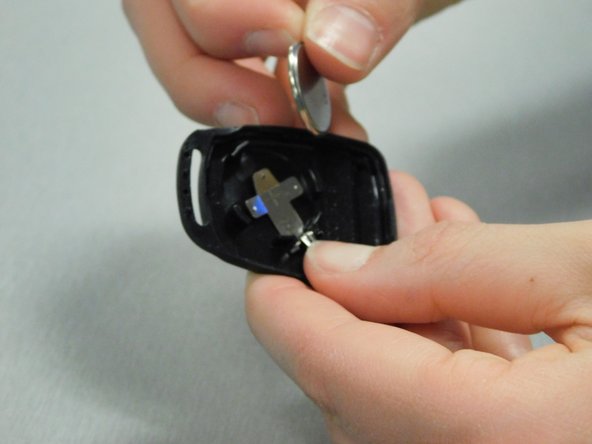
Insert the new CR2016 batteries with the positive side facing down, and make sure the batteries are secure under the prongs.
-

 Ask FixBot




Cancel: I did not complete this guide.
One other person completed this guide.

Team

University of Delaware, Team S10-G3, McGuire Spring 2018 Member of University of Delaware, Team S10-G3, McGuire Spring 2018
UD-MCGUIRE-S18S10G3
2 Members
12 Guides authored
