Free Shipping on Domestic Orders $75+

Fairphone 4 Loudspeaker Replacement

What you need

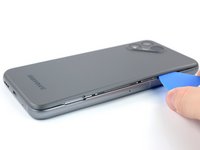
    1. Fairphone 4 Loudspeaker Replacement, Pry the back cover up: step 1, image 1 of 2 Fairphone 4 Loudspeaker Replacement, Pry the back cover up: step 1, image 2 of 2
      • Be sure to power off your phone before you begin.

      • Insert your thumbnail, or a prying tool like a spudger, into the notch at the bottom right of the back cover.

      • Pry the back cover up to start separating its plastic clips.

      Ask FixBot

      Add Comment

    2. Fairphone 4 Loudspeaker Replacement: step 2, image 1 of 3 Fairphone 4 Loudspeaker Replacement: step 2, image 2 of 3 Fairphone 4 Loudspeaker Replacement: step 2, image 3 of 3
      • Using your thumbnail or an opening pick, slide along the right side of the phone to loosen the plastic clips.

      Ask FixBot

      Add Comment

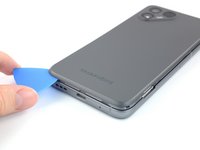
    3. Fairphone 4 Loudspeaker Replacement: step 3, image 1 of 3 Fairphone 4 Loudspeaker Replacement: step 3, image 2 of 3 Fairphone 4 Loudspeaker Replacement: step 3, image 3 of 3
      • Slide along the bottom of the phone to loosen the plastic clips.

      Ask FixBot

      Add Comment

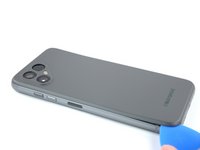
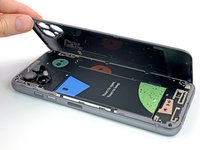
    4. Fairphone 4 Loudspeaker Replacement: step 4, image 1 of 3 Fairphone 4 Loudspeaker Replacement: step 4, image 2 of 3 Fairphone 4 Loudspeaker Replacement: step 4, image 3 of 3
      • Slide along the left side of the phone to loosen the plastic clips.

      • Lift the back cover to release the rest of the plastic clips and remove it.

      • To reinstall the back cover press it firmly into place until you hear a snap from the plastic clips.

      Ask FixBot

      Add Comment

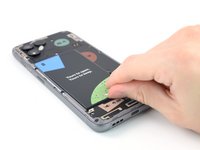
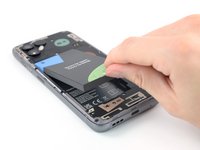
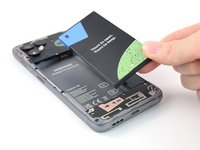
    1. Fairphone 4 Loudspeaker Replacement, Lever up the Battery: step 5, image 1 of 3 Fairphone 4 Loudspeaker Replacement, Lever up the Battery: step 5, image 2 of 3 Fairphone 4 Loudspeaker Replacement, Lever up the Battery: step 5, image 3 of 3
      • Use a fingernail or a prying tool at the marked notch to lever the battery out of its recess.

      • Lift the battery out of its recess and remove it.

      • Remove the battery.

      Ask FixBot

      Add Comment

    1. Fairphone 4 Loudspeaker Replacement, Unscrew the loudspeaker: step 6, image 1 of 1
      • Remove the six 4.8 mm-long Phillips screws.

      Ask FixBot

      Add Comment

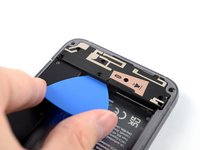
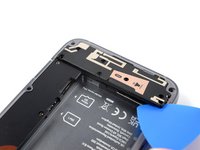
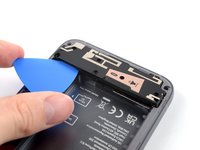
    2. Fairphone 4 Loudspeaker Replacement, Slide beneath the loudspeaker: step 7, image 1 of 2 Fairphone 4 Loudspeaker Replacement, Slide beneath the loudspeaker: step 7, image 2 of 2
      • Use an opening pick to slide beneath the loudspeaker.

      • Slide the opening pick to the right side of the loudspeaker to release the clips that hold it in place.

      Ask FixBot

      Add Comment

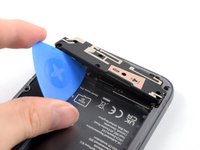
    3. Fairphone 4 Loudspeaker Replacement, Lift up the loudspeaker: step 8, image 1 of 2 Fairphone 4 Loudspeaker Replacement, Lift up the loudspeaker: step 8, image 2 of 2
      • Slide the opening pick to the left side of the loudspeaker to release the clips that hold it in place.

      • Twist the opening pick to lift up the loudspeaker.

      Ask FixBot

      Add Comment

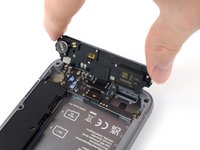
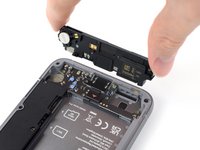
    4. Fairphone 4 Loudspeaker Replacement, Remove the loudspeaker: step 9, image 1 of 2 Fairphone 4 Loudspeaker Replacement, Remove the loudspeaker: step 9, image 2 of 2
      • Grab the loudspeaker and flip it towards the bottom to remove it.

      Ask FixBot

      Add Comment

Conclusion

To reassemble your device, follow these instructions in reverse order.

Take your e-waste to an R2 or e-Stewards certified recycler.

Repair didn’t go as planned? Try some basic troubleshooting, or ask our Answers community for help.


Cancel: I did not complete this guide.

Manuel Haeussermann

Member since: 07/13/22

26,644 Reputation

72 Guides authored

Team

iFixit Member of iFixit

Staff

123 Members

85,516 Guides authored

0 Guide Comments

Add Comment

View Statistics:

Past 24 Hours: 0

Past 7 Days: 15

Past 30 Days: 75

All Time: 3,234