Free Shipping on Domestic Orders $75+

Fairphone 4 Battery Replacement

What you need

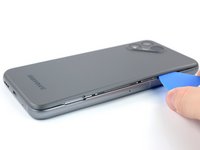
  1. Fairphone 4 Battery Replacement, Pry the back cover up: step 1, image 1 of 2 Fairphone 4 Battery Replacement, Pry the back cover up: step 1, image 2 of 2
    • Be sure to power off your phone before you begin.

    • Insert your thumbnail, or a prying tool like a spudger, into the notch at the bottom right of the back cover.

    • Pry the back cover up to start separating its plastic clips.

    Ask FixBot

    Add Comment

  2. Fairphone 4 Battery Replacement: step 2, image 1 of 3 Fairphone 4 Battery Replacement: step 2, image 2 of 3 Fairphone 4 Battery Replacement: step 2, image 3 of 3
    • Using your thumbnail or an opening pick, slide along the right side of the phone to loosen the plastic clips.

    Ask FixBot

    Add Comment

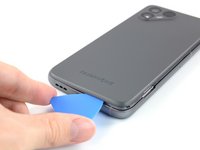
  3. Fairphone 4 Battery Replacement: step 3, image 1 of 3 Fairphone 4 Battery Replacement: step 3, image 2 of 3 Fairphone 4 Battery Replacement: step 3, image 3 of 3
    • Slide along the bottom of the phone to loosen the plastic clips.

    Ask FixBot

    Add Comment

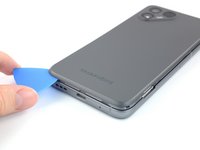
  4. Fairphone 4 Battery Replacement: step 4, image 1 of 3 Fairphone 4 Battery Replacement: step 4, image 2 of 3 Fairphone 4 Battery Replacement: step 4, image 3 of 3
    • Slide along the left side of the phone to loosen the plastic clips.

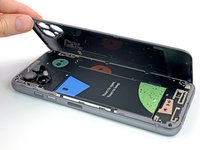
    • Lift the back cover to release the rest of the plastic clips and remove it.

    • To reinstall the back cover press it firmly into place until you hear a snap from the plastic clips.

    Ask FixBot

    Add Comment

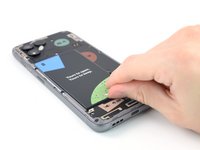
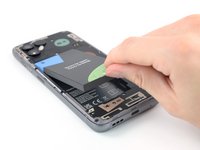
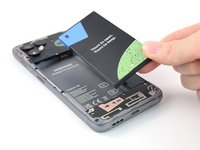
  5. Fairphone 4 Battery Replacement, Lever up the Battery: step 5, image 1 of 3 Fairphone 4 Battery Replacement, Lever up the Battery: step 5, image 2 of 3 Fairphone 4 Battery Replacement, Lever up the Battery: step 5, image 3 of 3
    • Use a fingernail or a prying tool at the marked notch to lever the battery out of its recess.

    • Lift the battery out of its recess and remove it.

    • Remove the battery.

    Ask FixBot

    Add Comment

Conclusion

For optimal performance, calibrate your newly installed battery after completing this guide.

To reassemble your device, follow these instructions in reverse order.

Take your e-waste to an R2 or e-Stewards certified recycler.

Repair didn’t go as planned? Try some basic troubleshooting, or ask our Answers community for help.

Cancel: I did not complete this guide.

14 other people completed this guide.

Manuel Haeussermann

Member since: 07/13/22

25,823 Reputation

71 Guides authored

Team

iFixit Member of iFixit

Staff

122 Members

26,593 Guides authored

2 Guide Comments

I am not sure steps 2,3,4 are really necessary in this guide.

Bartłomiej Tokarzewski - Reply Share

Can I find a compatible battery if I live in a country full of normies who use stock android and iphones?

Amit Yaron - Reply Share

Add Comment

View Statistics:

Past 24 Hours: 13

Past 7 Days: 90

Past 30 Days: 298

All Time: 13,589