Introduction
In severe cases of hardware failure, follow this guide to replace the motherboard of the Evercade EXP.
The motherboard is the brain of the console, so care should be taken when removing it to not damage any individual components if a replacement part is not prepared. Take extra care when disconnecting any ribbon or wire connectors, as those are much more difficult to replace.
Power the device off completely and ensure it is disconnected from any power source before beginning disassembly.
What you need
-
-
-
Lay the device on a flat surface, with the screen facing the sufrace.
-
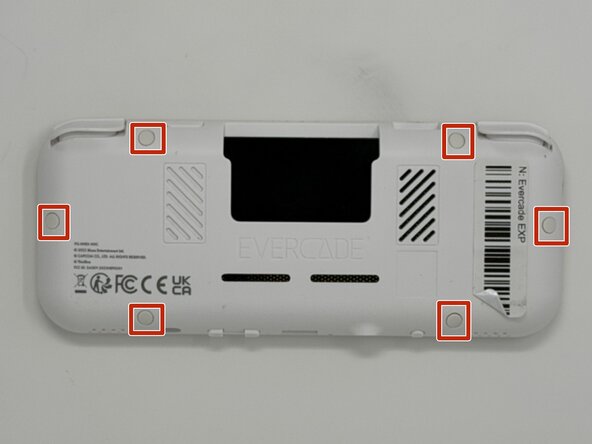
Using angled tweezers, remove the six rubber screw covers from the sockets.
 Ask FixBot
-
-
-
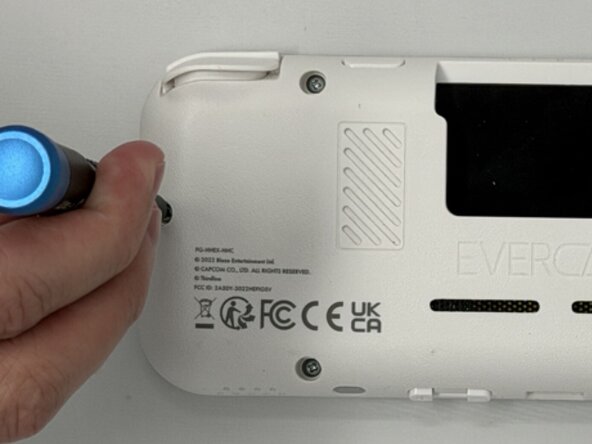
Using a Phillips #00 screwdriver, remove the six 8 mm screws on the lower case.
-
-
-
Flip the device so the screen is facing you.
-
Four hidden retaining clips hold the pieces together even near each corner of the screen.
-
Insert a Jimmy into the seam located between the faceplate and the shell.
-
Move the a Jimmy toward the screen until you find the first clasp. Move the handle of the jimmy tool up to pop the faceplate free from the clasp.
-
Repeat until for each of the four clasps to fully release the faceplate from the shell.
-
-
-
-
Flip the faceplate away from the shell carefully. The faceplate is still connected to the motherboard via a ribbon cable.
-
Flip up the locking flap securing the display ribbon cable, then use tweezers to disconnect the ribbon cable.
-
-
-
-
-
Use a Phillips #00 screwdriver to remove all ten 8 mm screws securing the motherboard.
-
-
-
Using angled tweezers, gently lift both speakers from the cavities they rest in.
-
-
-
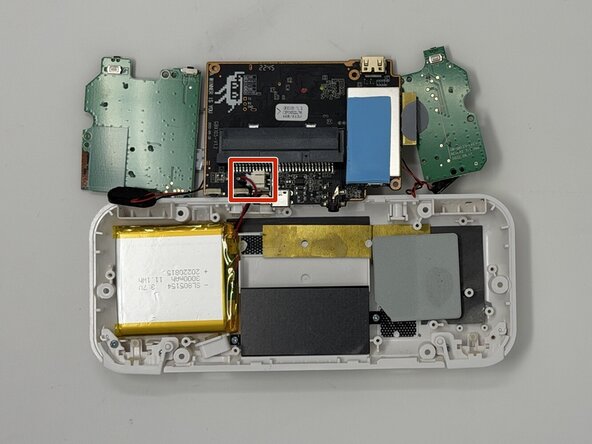
Flip the motherboard to the outside of the console.
-
Remove the connector from the socket attached to the motherboard. The piece is held in place near the back of the socket. Apply downward pressure while pulling out to make the removal easier.
-
-






Team

Utah Tech University, Team 1-6, McMurrin Spring 2026 Member of Utah Tech University, Team 1-6, McMurrin Spring 2026
UTAHTECH-MCMURRIN-S26S1G6
3 Members
77 Guides authored
