Introduction
The buttons located on the side panel of the printer help communicate with functions that need to be performed such as scanning, copying, printing photos and turning the device on and off. Sometimes these buttons get stuck and need to be cleaned or replaced.
What you need
-
-
-
Go to the left side of the printer and locate the control panel with the buttons on it.
-
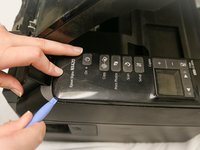
Take a plastic opening tool and stick it in the crack between the top of the panel and the body of the printer.
-
Pry the cover of the panel away from the body of the printer until the panel releases from the body of the printer.
 Ask FixBot
-
-
-
Carefully lift up the panel cover and turn it to its side so that the buttons are facing towards the rest of the printer.
-
Notice that the panel cover is attached to the printer with a ribbon cable. The ribbon cable must stay connected to the body of the printer or else the buttons will be unresponsive once replaced.
-
-
-
-
Remove the six 3mm Phillips #2 screws connecting the control panel to the circuit board.
-
-
-
After unscrewing, carefully lift the plastic part of the control panel away from the circuit board.
-
The plastic part of the control panel is now separate.
-
-
-
Flip over the plastic part of the now separated control panel.
-
Remove the buttons by pulling them up with your fingers.
-
-




To reassemble your device, follow these instructions in reverse order.

Team

University of Maine, Team 2-4, Diaz Fall 2016 Member of University of Maine, Team 2-4, Diaz Fall 2016
UMAINE-DIAZ-F16S2G4
4 Members
12 Guides authored
