
Epson Powerlite 460 Filter Replacement

Korinna Curry and 4 other contributors
Last updated on Jun 21, 2022
Views: 494
View statistics:
- Past 24 Hours:
- 2
- Past 7 Days:
- 11
- Past 30 Days:
- 58
- All Time:
- 494
Comments: 0
No one has left comments on this guide. Will you be first?
Go to guide commentsCompleted: 0 1
No one has marked this guide "completed." Will you be the first?
1 person has marked this guide "completed." It's you — great job!
Favorites: 0 1
No one has favorited (and subscribed to) this guide. Will you be the first?
1 person has favorited (and subscribed to) this guide — and that's you!
Introduction
Go to step 1 ↓This guide demonstrates how to remove and replace the air filter in your Epson PowerLite 460.
A filter keeps the dust and debris out of the device in order for the device to stay clean. Overheating can occur if the air filter is damaged or clogged, which can cause the device to not run properly. If so, replace or clean the filter.
Review the troubleshooting guide before replacing the filter. Other factors can cause overheating in the Powerlite 460.
-
-
-
Orient the device with the projection window on top with the name of the device right side up.
 Ask FixBot
-
-
-
Slide the air filter cover opener in the direction indicated by the arrow to release the air filter cover.
-
-
-
-
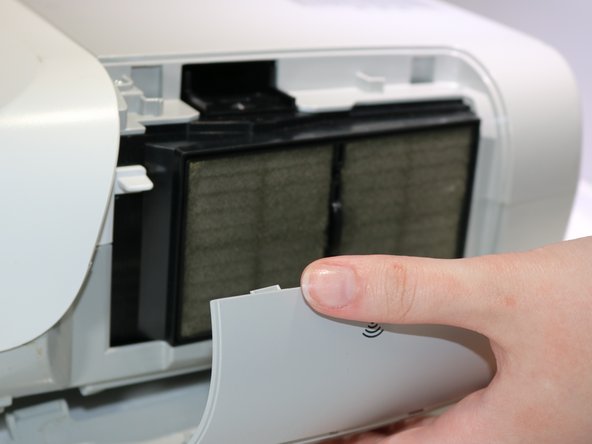
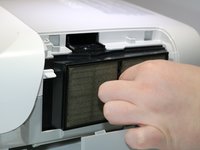
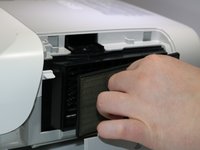
Pinch the air filter cover handle and gently pull the filter away from the device
-
-



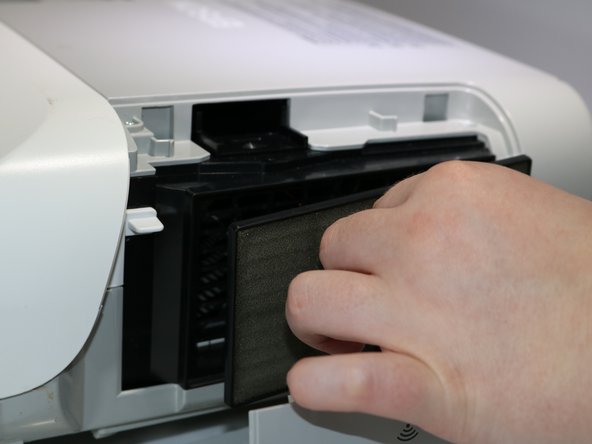
To reassemble your device, follow these instructions in reverse order.

Team

Eastern Washington University, Team 1-1, Carnegie Spring 2022 Member of Eastern Washington University, Team 1-1, Carnegie Spring 2022
EWU-CARNEGIE-S22S1G1
3 Members
60 Guides authored
