
Emerson EM744 Camera Replacement

Micalle Marin and 5 other contributors
Last updated on May 7, 2024
Views: 640
View statistics:
- Past 24 Hours:
- 2
- Past 7 Days:
- 19
- Past 30 Days:
- 87
- All Time:
- 640
Comments: 0
No one has left comments on this guide. Will you be first?
Go to guide commentsCompleted: 0 1
No one has marked this guide "completed." Will you be the first?
1 person has marked this guide "completed." It's you — great job!
Favorites: 0 1
No one has favorited (and subscribed to) this guide. Will you be the first?
1 person has favorited (and subscribed to) this guide — and that's you!
Introduction
Go to step 1 ↓If the tablet has out of focus pictures or doesn't take them at all, this guide will show you how to replace the camera. Tools that are needed will include a Phillips Head screwdriver with a #00 3mm screw, spudger, plastic opening tool, as well as a pair of tweezers to properly remove the broken equipment.
What you need
Tools
-
Spudger4.9
-


-
-
-
Use a Phillips 00 bit to remove two 3mm screws from the bottom of the tablet.
 Ask FixBot
-
-
-
Insert the nylon spudger into the bottom of the tablet, and gently slide it up the side.
-
Pull apart the two sides of the tablet, exposing the circuit board, battery, and other components of the tablet.
-
-
-
-
-
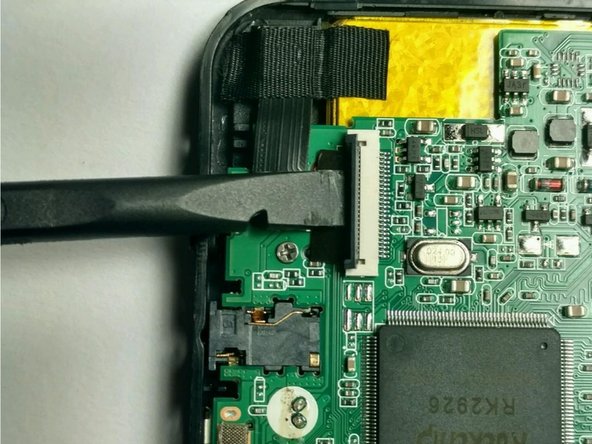
Using the spudger to raise the zero insertion force (ZIF) connector to freely release the ribbon.
-
-
-
Tool used on this step:Tweezers$4.99
-
Using tweezers gently pull the ribbon off of the enclosure.
-
Remove the camera.
-
-



To reassemble your device, follow these instructions in reverse order.

Team

USF Tampa, Team 2-5, Blackwell Fall 2016 Member of USF Tampa, Team 2-5, Blackwell Fall 2016
USFT-BLACKWELL-F16S2G5
4 Members
72 Guides authored
