Free Shipping on Domestic Orders $75+

Ematic FunTab 3 Touch Screen Replacement

What you need

    1. Ematic FunTab 3 Touch Screen Replacement, Back Panel: step 1, image 1 of 3 Ematic FunTab 3 Touch Screen Replacement, Back Panel: step 1, image 2 of 3 Ematic FunTab 3 Touch Screen Replacement, Back Panel: step 1, image 3 of 3
      • Turn off the device before starting

      • To prevent damage, open the device on the side without the buttons.

      • Insert the hooked end of the plastic opening tool in the gap between the screen and the back panel on the edge of the device.

      • Slide the plastic opening tool down the long side of the device.

      • Insert tool again and slide it down the long slide of the case a second time.

      Ask FixBot

      Add Comment

    2. Ematic FunTab 3 Touch Screen Replacement: step 2, image 1 of 1
      • Pull the back panel away from the screen.

      Ask FixBot

      Add Comment

    1. Ematic FunTab 3 Touch Screen Replacement, Motherboard: step 3, image 1 of 1
      • Remove the black tape to reveal the screen connector.

      Ask FixBot

      Add Comment

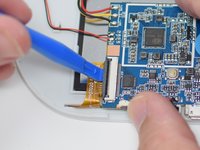
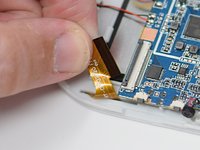
    2. Ematic FunTab 3 Touch Screen Replacement: step 4, image 1 of 2 Ematic FunTab 3 Touch Screen Replacement: step 4, image 2 of 2
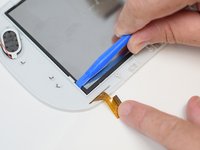
      • Flip up the retaining tab using the plastic opening tool.

      • Pull out the screen wire ribbon to disconnect the screen and motherboard.

      Ask FixBot

      Add Comment

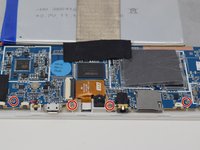
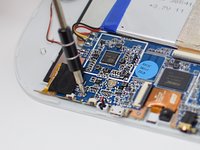
    3. Ematic FunTab 3 Touch Screen Replacement: step 5, image 1 of 2 Ematic FunTab 3 Touch Screen Replacement: step 5, image 2 of 2
      • Using a PH 00 screwdriver, remove the four 4.5 mm screws that are holding the motherboard in place.

      Ask FixBot

      Add Comment

    4. Ematic FunTab 3 Touch Screen Replacement: step 6, image 1 of 1
      • It is now safe to remove and replace the old motherboard with your new motherboard.

      • Close the black ribbon retaining tabs once ribbons are inserted during reassembly.

      Ask FixBot

      Add Comment

    1. Ematic FunTab 3 Touch Screen Replacement, Touch Screen: step 7, image 1 of 2 Ematic FunTab 3 Touch Screen Replacement, Touch Screen: step 7, image 2 of 2
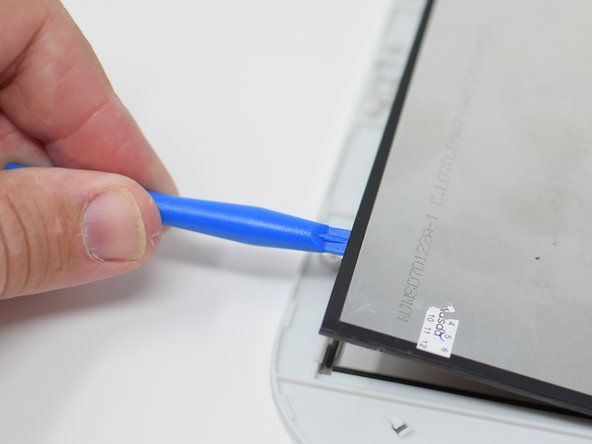
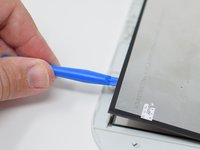
      • Insert the hook side of the opening tool between the case and display.

      • Press down on the tool until the screen is clear of the white retaining tabs.

      • Use the plastic opening tool to gently pry up the screen.

      • This is best done on the corner closest to the wire ribbon.

      • Continue prying around the screen until the screen pops out.

      Ask FixBot

      Add Comment

    2. Ematic FunTab 3 Touch Screen Replacement: step 8, image 1 of 1
      • After the screen has come lose, remove it from the device.

      • When reassembling, make sure the screen locks in place, this may require extra pressure

      • Close the black ribbon retaining tabs once ribbons are inserted during reassembly.

      Ask FixBot

      Add Comment

Conclusion

To reassemble your device, follow these instructions in reverse order.

Cancel: I did not complete this guide.

Amanda Davis

Member since: 07/11/18

581 Reputation

5 Guides authored

Team

UW Tacoma, Team S1-G5, Cardinal Summer 2018 Member of UW Tacoma, Team S1-G5, Cardinal Summer 2018

UWT-CARDINAL-SU18S1G5

4 Members

72 Guides authored

1 Guide Comment

Where can I get a new display for my emoticons funtab 3?

DanTheMan RBLX - Reply Share

Add Comment

View Statistics:

Past 24 Hours: 0

Past 7 Days: 2

Past 30 Days: 23

All Time: 1,260