Free Shipping on Domestic Orders $75+

Ecovacs Deebot 900 Bottom Case Replacement

What you need

    1. Ecovacs Deebot 900 Bottom Case Replacement, Battery: step 1, image 1 of 1
      • Remove all the brushes from the Deebot.

      Ask FixBot

      Add Comment

    2. Ecovacs Deebot 900 Bottom Case Replacement: step 2, image 1 of 1
      • Using a Phillips #0 screwdriver, remove the two 12.25 mm screws holding the battery cover in place.​

      Ask FixBot

      Add Comment

    3. Ecovacs Deebot 900 Bottom Case Replacement: step 3, image 1 of 1
      • Remove the battery cover.

      Ask FixBot

      Add Comment

    4. Ecovacs Deebot 900 Bottom Case Replacement: step 4, image 1 of 1
      • Using the two white straps on the sides of the battery, gently remove the battery. ​

      • Be careful not to rip out the battery cable.

      Ask FixBot

      Add Comment

    5. Ecovacs Deebot 900 Bottom Case Replacement: step 5, image 1 of 1
      • Carefully disconnect the battery cable by pulling near the connector at the bottom of the battery compartment.

      Ask FixBot

      Add Comment

    1. Ecovacs Deebot 900 Bottom Case Replacement, Front Bumper: step 6, image 1 of 2 Ecovacs Deebot 900 Bottom Case Replacement, Front Bumper: step 6, image 2 of 2
      • Using a Phillips #00 screwdriver, remove the eight screws on the bottom edge of the bumper. ​

      Ask FixBot

      Add Comment

    2. Ecovacs Deebot 900 Bottom Case Replacement: step 7, image 1 of 1
      • Remove the black strip on the bottom of the bumper.

      Ask FixBot

      Add Comment

    3. Ecovacs Deebot 900 Bottom Case Replacement: step 8, image 1 of 2 Ecovacs Deebot 900 Bottom Case Replacement: step 8, image 2 of 2
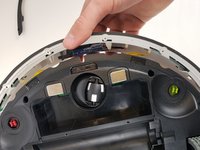
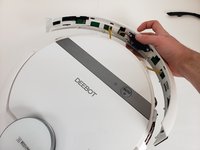
      • Carefully lift up the bumper untill it pops out of place.​

      Ask FixBot

      Add Comment

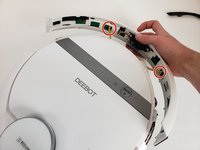
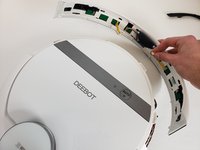
    4. Ecovacs Deebot 900 Bottom Case Replacement: step 9, image 1 of 2 Ecovacs Deebot 900 Bottom Case Replacement: step 9, image 2 of 2
      • Disconnect the two cables connecting the bumper to the body of the Deebot.

      • Remove the front bumper from the device.

      Ask FixBot

      Add Comment

    1. Ecovacs Deebot 900 Bottom Case Replacement, Bottom Case: step 10, image 1 of 2 Ecovacs Deebot 900 Bottom Case Replacement, Bottom Case: step 10, image 2 of 2
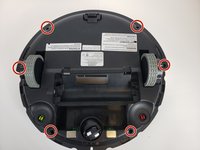
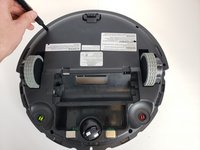
      • Using a Phillips #00 screwdriver, take out the six screws around the perimeter of the bottom case.

      Ask FixBot

      Add Comment

    2. Ecovacs Deebot 900 Bottom Case Replacement: step 11, image 1 of 2 Ecovacs Deebot 900 Bottom Case Replacement: step 11, image 2 of 2
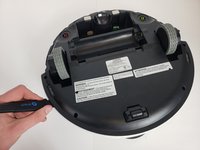
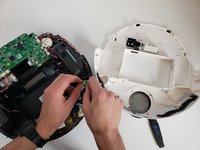
      • Insert a Jimmy into the seam and work all the way around the robot.

      • Disconnect the two cables and remove the bottom case from the device.

      Ask FixBot

      Add Comment

Conclusion

To reassemble your device, follow these instructions in reverse order.

Cancel: I did not complete this guide.

3 other people completed this guide.

0 Guide Comments

Add Comment

View Statistics:

Past 24 Hours: 1

Past 7 Days: 6

Past 30 Days: 42

All Time: 3,289