
EVGA x17 Clicker Replacement

Sydney Puett and 4 other contributors
Last updated on Dec 27, 2023
Views: 698
View statistics:
- Past 24 Hours:
- 1
- Past 7 Days:
- 16
- Past 30 Days:
- 79
- All Time:
- 698
Comments: 1
1 guide comment.
Go to guide commentsCompleted: 0 1
No one has marked this guide "completed." Will you be the first?
1 person has marked this guide "completed." It's you — great job!
Favorites: 0 1
No one has favorited (and subscribed to) this guide. Will you be the first?
1 person has favorited (and subscribed to) this guide — and that's you!
Introduction
Go to step 1 ↓This guide contains steps for replacing faulty clickers on the EVGA x17 gaming mouse. Malfunctioning clickers might be due to gunk buildup, broken parts, or faulty wiring. Follow this guide for instructions of how to replace them.
What you need
Tools
-
Spudger4.9


-
-
-
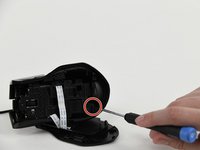
Use a Phillips head screwdriver to remove the 5 screws that secure the bottom panel.
-
-
-
Slowly slide a spudger into and around the bottom of the panel, prying until a "popping" sound is heard.
-
-

 Ask FixBot


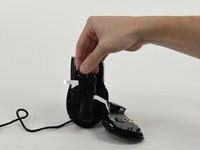


To reassemble your device, follow these instructions in reverse order.

Team

University of Colorado Denver, Team 1-4, Campeau Fall 2023 Member of University of Colorado Denver, Team 1-4, Campeau Fall 2023
UCDENVER-CAMPEAU-F23S1G4
7 Members
60 Guides authored
1 Guide Comment
Tengo un Evga x17 y cuando quitó los sliders, encuentro unas pequeñas capas de plástico que tapan el acceso a los tornillos, ¿qué puedo hacer en ese caso?
