Introduction
If your EPOS Sennheiser GSP 302 headset has a loose, unresponsive, or jammed volume wheel, this guide will help you replace it. A faulty volume wheel can cause issues such as uneven audio levels, difficulty adjusting sound, or complete loss of volume control. For this guide, you will need to use a soldering iron to solder and desolder connections. Note that the volume wheel is located on the right earcup.
What you need
-
-
-
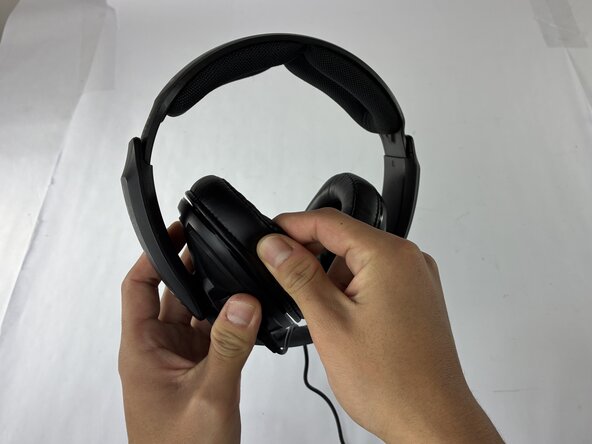
Hold the headset firmly with one hand.
-
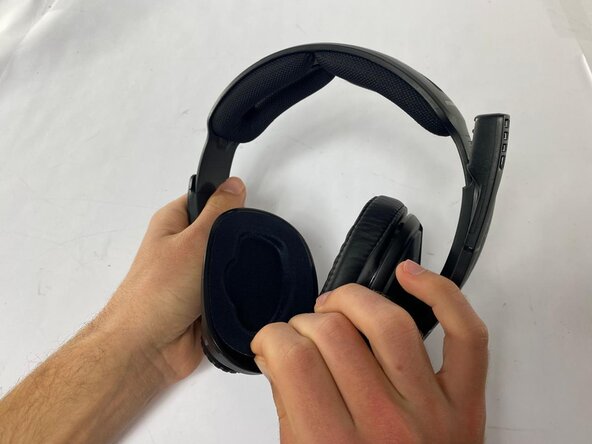
Grip the edge of the earpad with your fingers.
-
Gently pull the earpad outward.
-
Work your way around the earpad, rotating it 360 degrees until it separates from the headset.
 Ask FixBot
-
-
-
-
-
Gently scratch at the edge of the protective fabric layer covering the driver.
-
Carefully pull the fabric layer off, being mindful not to damage it in the process.
-
-
-
-
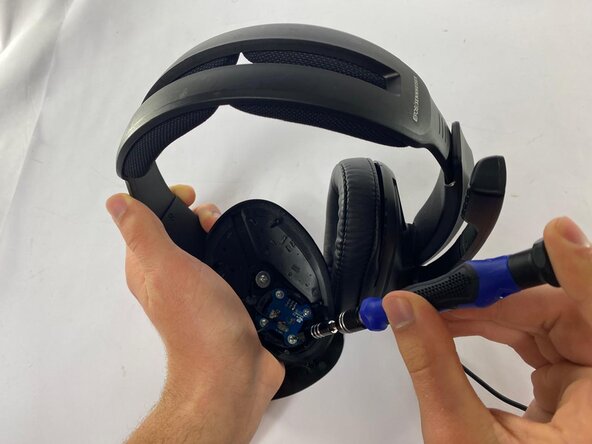
Remove the four 7.0 mm screws holding the speaker driver in place with a Phillips #1 screwdriver.
-
Carefully disconnect the speaker driver from the earcup by desoldering the connection with a soldering iron.
-
-
-
-
-
Remove the four 5.9 mm screws holding the volume control potentiometer in place with a Phillips #1 screwdriver.
-
Remove the volume control potentiometer from the earcup.
-
-
-
-
-
Remove the three 6.0 mm screws holding the volume wheel in place with a Phillips #1 screwdriver.
-
Remove the volume wheel.
-
-






To reassemble your device, follow these instructions in reverse order.

Team

UMass Dartmouth, Team 3-4, Biswokarma Fall 2025 Member of UMass Dartmouth, Team 3-4, Biswokarma Fall 2025
UMASSD-BISWOKARMA-F25S3G4
4 Members
60 Guides authored
