
Dyson DC58 Filter Replacement

Alexis Gutierrez and 5 other contributors
Last updated on Apr 18, 2025
Views: 13K
View statistics:
- Past 24 Hours:
- 6
- Past 7 Days:
- 35
- Past 30 Days:
- 136
- All Time:
- 12,575
Comments: 0
No one has left comments on this guide. Will you be first?
Go to guide commentsCompleted: 5 6
5 people have marked this guide "completed." Will you be next?
6 people have marked this guide "completed." Including you — great job!
Favorites: 1 2
1 person has favorited (and subscribed to) this guide. Will you be next?
2 people have favorited (and subscribed to) this guide — including you!
Better Introduction
Improve this guide by completing or revising its introduction.
What you need

-
-
-
Prior to starting, make sure vacuum is unplugged.
-
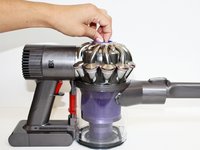
Set down the vacuum so that the clear debris bin is at the base of the vacuum and the silver cyclone is at the top.
 Ask FixBot
-
-
-
-
Twist the blue knob clockwise.
-
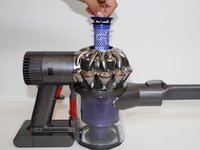
Gently lift the filter up and out of the center of the vacuum cyclone (the silver part at the top of the vacuum).
-
-


To reassemble your device, follow these instructions in reverse order.
Cancel: I did not complete this guide.
5 other people completed this guide.

Team

CSU Fullerton, Team 2-4, Bruce Fall 2015 Member of CSU Fullerton, Team 2-4, Bruce Fall 2015
CSUF-BRUCE-F15S2G4
4 Members
60 Guides authored
