
Dyson DC58 Bin Replacement

Ian Sloan and 4 other contributors
Last updated on Jan 17, 2018
Views: 14K
View statistics:
- Past 24 Hours:
- 3
- Past 7 Days:
- 18
- Past 30 Days:
- 112
- All Time:
- 14,414
Comments: 2
2 guide comments.
Go to guide commentsCompleted: 3 4
3 people have marked this guide "completed." Will you be next?
4 people have marked this guide "completed." Including you — great job!
Favorites: 1 2
1 person has favorited (and subscribed to) this guide. Will you be next?
2 people have favorited (and subscribed to) this guide — including you!
Introduction
Go to step 1 ↓This guide will show you how to open and replace the bin of your Dyson DC58.
-
-
-
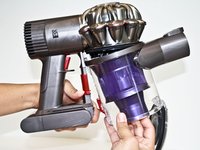
Locate the red lever parallel to the red trigger and on the side of the clear bin.
-
-
-
Push the red lever downward to open the clear bin. You may need to do this over a trash bin if there is debris in the clear bin.
-
-
-
-
Push the red lever downward again while pulling the clear bin away from the main body of the Dyson vacuum.
-

 Ask FixBot


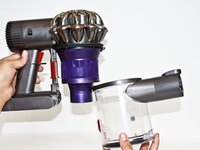
To reassemble your device, follow these instructions in reverse order.
Cancel: I did not complete this guide.
3 other people completed this guide.

Team

CSU Fullerton, Team 2-4, Bruce Fall 2015 Member of CSU Fullerton, Team 2-4, Bruce Fall 2015
CSUF-BRUCE-F15S2G4
4 Members
60 Guides authored
2 Guide Comments
The bin is stuck and won’t come off, although I have followed the directions above.
I think the reassembly instructions should be numbered “Step 5” and printed right below Step 4. They aren’t that easy to see.
