Free Shipping on Domestic Orders $75+

Dyson DC08 brush replacement

Views: 22K

View statistics:

Past 24 Hours:
9
Past 7 Days:
44
Past 30 Days:
184
All Time:
21,688
Comments: 17

1 comment on steps, 16 guide comments.

Go to guide comments
Completed: 17

17 people have marked this guide "completed." Will you be next?

Favorites: 3

3 people have favorited (and subscribed to) this guide. Will you be next?

Time Required: 30 minutes
Difficulty: Moderate
Community-Contributed Guide

An awesome member of our community made this guide. It was not created by iFixit staff.

Dyson DC08 brush replacement

What you need

    1. Dyson DC08 brush replacement, Brush: step 1, image 1 of 3 Dyson DC08 brush replacement, Brush: step 1, image 2 of 3 Dyson DC08 brush replacement, Brush: step 1, image 3 of 3
      • Take off the dust cannister.

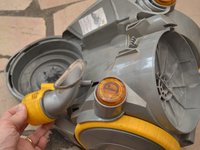
      • Remove the suction hose.

      Ask FixBot
      Add Comment

    2. Dyson DC08 brush replacement: step 2, image 1 of 3 Dyson DC08 brush replacement: step 2, image 2 of 3 Dyson DC08 brush replacement: step 2, image 3 of 3
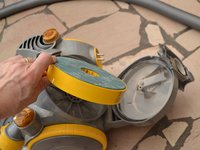
      • Extract the front filter.

      Ask FixBot

      Add Comment

    3. Dyson DC08 brush replacement: step 3, image 1 of 3 Dyson DC08 brush replacement: step 3, image 2 of 3 Dyson DC08 brush replacement: step 3, image 3 of 3
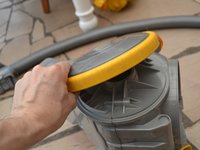
      • Extract the rear filter.

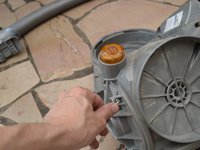
      • Unscrew the first Torx screw.

      Ask FixBot

      Add Comment

    4. Dyson DC08 brush replacement: step 4, image 1 of 2 Dyson DC08 brush replacement: step 4, image 2 of 2
      • Optionally, remove the rear filter cover.

      Ask FixBot

      Add Comment

    5. Dyson DC08 brush replacement: step 5, image 1 of 2 Dyson DC08 brush replacement: step 5, image 2 of 2
      • Unscrew the 2nd Torx screw.

      • Disassemble the suction hose connection (optional)

      Ask FixBot

      Add Comment

    6. Dyson DC08 brush replacement: step 6, image 1 of 3 Dyson DC08 brush replacement: step 6, image 2 of 3 Dyson DC08 brush replacement: step 6, image 3 of 3
      • Remove the wheels.

      • The wheels clip onto the body of the appliance.

      • Unscrew the 4 Torx screws (two in the right and two on the left).

      Ask FixBot

      Add Comment

    7. Dyson DC08 brush replacement: step 7, image 1 of 2 Dyson DC08 brush replacement: step 7, image 2 of 2
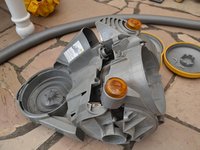
      • Open the body of the vacuum cleaner.

      • You can use a multimeter to test the switch.

      • Disconnect the brown wire at the switch.

      • Disconnect the blue wire at the single connector by the motor.

      • Lift out the motor.

      Ask FixBot

      Add Comment

    8. Dyson DC08 brush replacement: step 8, image 1 of 2 Dyson DC08 brush replacement: step 8, image 2 of 2
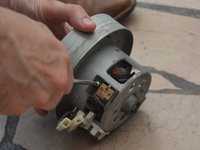
      • Open the motor housing (4 clips).

      • Remover the motor from its plastic casing.

      • Disconnect the motor.

      Ask FixBot

      Add Comment

    9. Dyson DC08 brush replacement: step 9, image 1 of 3 Dyson DC08 brush replacement: step 9, image 2 of 3 Dyson DC08 brush replacement: step 9, image 3 of 3
      • disassembly of 2 engine coals (1 Phillips screw per coal)

      Ask FixBot

      Add Comment

    10. Dyson DC08 brush replacement: step 10, image 1 of 3 Dyson DC08 brush replacement: step 10, image 2 of 3 Dyson DC08 brush replacement: step 10, image 3 of 3
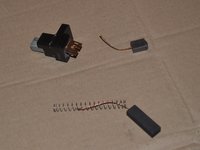
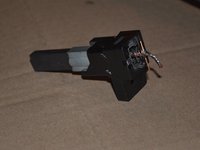
      • Worn brush.

      • Opening the brush housing.

      Ask FixBot
      Add Comment
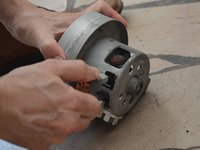
    11. Dyson DC08 brush replacement: step 11, image 1 of 3 Dyson DC08 brush replacement: step 11, image 2 of 3 Dyson DC08 brush replacement: step 11, image 3 of 3
      • Extraction of the brush and spring.

      Ask FixBot

      Add Comment

    12. Dyson DC08 brush replacement: step 12, image 1 of 2 Dyson DC08 brush replacement: step 12, image 2 of 2
      • Removing the brush.

      Ask FixBot

      Add Comment

    13. Dyson DC08 brush replacement: step 13, image 1 of 2 Dyson DC08 brush replacement: step 13, image 2 of 2
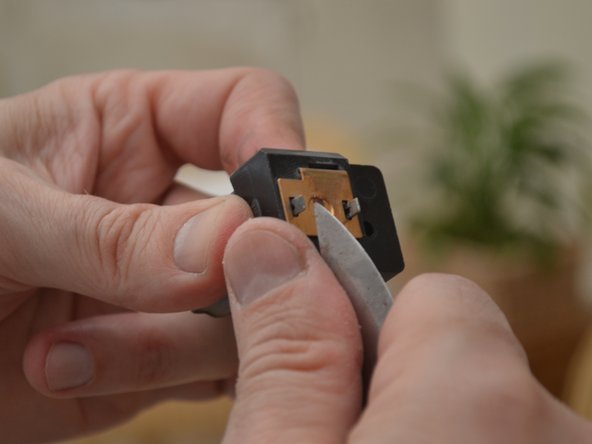
      • Soldering a new brush.

      Ask FixBot

      Add Comment

Conclusion

To reassemble your device, follow these instructions in reverse order.

Cancel: I did not complete this guide.

17 other people completed this guide.

Special thanks to these translators:

fr en

100%

These translators are helping us fix the world! Want to contribute?
Start translating ›

christophe

Member since: 07/14/12

806 Reputation

2 Guides authored

16 Guide Comments

Very useful guide - I treated myself to a new motor as the cost was not much more than the cost of replacement brushes.

Bob - Reply Share

Hi, where did you buy the new motor?

Nadja - Reply Share

Bravo, très bon tutoriel

shog shog - Reply Share

Bonjour

et si on n’a rien pour souder, y a t’il une autre solution svp?

GALLAS - Reply Share

Bonjour ! Si vous ne disposez pas de matérial de soudure, nous vous conseillons de vous rendre à un Repair Café ou un Fab Lab. Ces associations mettent du matériel à disposition et peuvent éventuellement aussi vous conseiller sur la démarche à suivre. Bonne réparation !

Claire Miesch - Reply Share

Add Comment

View Statistics:

Past 24 Hours: 9

Past 7 Days: 44

Past 30 Days: 184

All Time: 21,688