Free Shipping on Domestic Orders $75+

Drill Master Heat Gun Motor Replacement

Views: 2.6K

View statistics:

Past 24 Hours:
5
Past 7 Days:
28
Past 30 Days:
103
All Time:
2,631
Comments: 1

1 guide comment.

Go to guide comments
Completed: 1

1 person has marked this guide "completed." Will you be next?

Favorites: 1

1 person has favorited (and subscribed to) this guide. Will you be next?

Time Required: No estimate
Difficulty: Moderate
Drill Master Heat Gun Motor Replacement

Introduction

Go to step 1 ↓

The motor inside the barrel of the gun powers the fan. Use this guide to replace the motor.

What you need

Tools

    1. Drill Master Heat Gun Motor Replacement, Motor: step 1, image 1 of 1
      • Be sure the heat gun is unplugged before starting this process.

      • Remove the seven 14mm screws from the side of the drill using the PH#0 screwdriver.

      • You will need a screwdriver extension.

      Ask FixBot

      Add Comment

    2. Drill Master Heat Gun Motor Replacement: step 2, image 1 of 1
      • Remove the 8mm screw from underside of barrel using the PH#0 screwdriver.

      • Don't try to open the casing just yet.

      Ask FixBot

      Add Comment

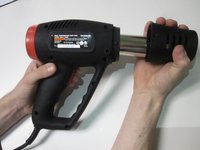
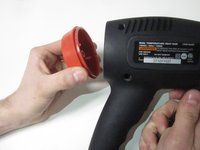
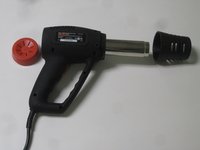
    3. Drill Master Heat Gun Motor Replacement: step 3, image 1 of 3 Drill Master Heat Gun Motor Replacement: step 3, image 2 of 3 Drill Master Heat Gun Motor Replacement: step 3, image 3 of 3
      • Remove the barrel casing on either end by twisting and pulling each side off.

      Ask FixBot

      Add Comment

    4. Drill Master Heat Gun Motor Replacement: step 4, image 1 of 1
      • Remove the top casing to reveal inside of drill. You might have to tug a little harder for this one.

      Ask FixBot

      Add Comment

    5. Drill Master Heat Gun Motor Replacement: step 5, image 1 of 1
      • Remove the metal casing and fan cover from the fan unit.

      Ask FixBot

      Add Comment

    6. Drill Master Heat Gun Motor Replacement: step 6, image 1 of 1
      • Bend the metal prongs backward that connect the fan motor to the plastic cap.

      • Bending the brackets too far back can cause the brackets to break.

      Ask FixBot

      Add Comment

    7. Drill Master Heat Gun Motor Replacement: step 7, image 1 of 1
      • Remove the plastic cap from the motor,

      • This will allow you to work only with the motor and fan.

      Ask FixBot

      Add Comment

    8. Drill Master Heat Gun Motor Replacement: step 8, image 1 of 1
      • Remove the fan by pulling it from the motor rod.

      Ask FixBot

      Add Comment

    9. Drill Master Heat Gun Motor Replacement: step 9, image 1 of 1
      • Remove the two 12mm screws from the plastic fan casing using PH#00

      Ask FixBot

      Add Comment

    10. Drill Master Heat Gun Motor Replacement: step 10, image 1 of 1
      • Remove the plastic fan casing.

      Ask FixBot

      Add Comment

    11. Drill Master Heat Gun Motor Replacement: step 11, image 1 of 1
      • Remove the metal casing from the motor and insert the new motor in its place.

      • You may have to tug a little.

      Ask FixBot

      Add Comment

Conclusion

To reassemble your device, follow these instructions in reverse order.

Cancel: I did not complete this guide.

One other person completed this guide.

1 Guide Comment

Where can I find a new motor?

jstabler38 - Reply Share

Add Comment

View Statistics:

Past 24 Hours: 5

Past 7 Days: 28

Past 30 Days: 103

All Time: 2,631